Map service doesn't draw initially.

We have a map service in our site that doesn't seem to want to draw initially. There are no errors in the log, it just simply isn't making the call to the server. The only way we can get to the service to draw is if the entire map service group is unchecked, then re-checked to display. Only then, does it decide to make the call to the server and retrieve the map image.
The site contains many map services. This is the only map service/layer group that we've found that has this behavior.
Anybody run across this before?
0
-
To clarify, this was an upgrade to 4.9, HTML5V 2.10.
Accessing map resources from ArcGIS Server 10.50 -

I had something similar happen. Mine had to do with Layer Themes and I had to go into the Site.xml file to fix it. Are you using layer themes? 0 -
I had done the upgrade to 2.10, but not the AGS 10.5. The change that I did was place all themes into theme settings at end of service containing missing layers. If you do not allow direct access to all your themes, then you only need to put in the default theme. I do create URLs to access each layer theme directly, so I added them all: 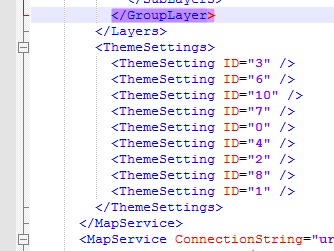 0
0 -
Yes, we are definitely using layer themes, however it's not that the layers are missing... It's that they don't draw when toggled from the table of contents. If a user toggles the layer to draw, nothing happens. In order to get the layer to draw, we have to toggle the group off/on and then the layer begins to draw. 0 -
It is similar behavior to what we had. Some of my labels were not working, except when the user unchecked and then checked the layer group that they were in. 0 -
Here is my solution for anyone else experiencing this issue. I resolved the drawing issue by adding the map service as a Feature Layer instead of a map service. This immediately fixed the issue and my layer began drawing. 0 -
Much more resouce intensive to have Feature layer... 0
Bitte melden Sie sich an, um einen Kommentar zu hinterlassen.
Kommentare
7 Kommentare