Multiple files from FilePicker

I have a Form within my workflow and a file picker widget within that. I was wondering if there was a way to allow the user to select multiple files, but 1 at a time. i.e I want them to select their file, click OK, then be able to go and select a 2nd file. I know that within the widget that we can turn on the "Allow Multiple Files" which will allow them to select the multiple files when the dialog opens, but what if they pick one - click ok, and then want to pick a second one. This seems to overwrite the first one. Is this a setting somewhere that I am missing? Does anyone know if this is possible?
Thanks
Darryl
0
-

Is the number of files fixed? Then you can use multiple FilePickers on a form.
Else you will have to reload your form.0 -
There isn't a set # of files. It will change based on the scenario. See in the screen shot below - I have select 1 file - callede Capture1.png. Now if I click the Browse button again and select a new file - it overwrites the original. I just wanted to know if there was a way to now add a 2nd file after the first one is selected? 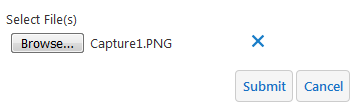 0
0 -

Darryl,
You can select multiple files by holding down CTRL when selecting files. Once you've selected the files and clicked "Open" the file picker should display the number of files like this: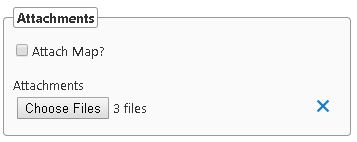 0
0 -
Thanks Jared. This works great on a desktop, but when I am using my IPAD to take new pictures - I am only able to take 1 and submit it. Any thoughts on this? 0 -
Hi Darryl,
Depending on what you're using it for, could you simply add more than one file picker to the form? You could have some logic later in the workflow to detect whether the second one (or nth one) was used, and move all the files they provided into the same list, and then act on that. If you don't know how many file pickers they would need ahead of time, you could provide a prompt before the form to ask how many they want, then generate that number of file pickers dynamically in the form's runtime modifications.
Another idea would be to set up the DisplayForm inside a flowchart and give it "add another" and "next" buttons. The "add another" button could add the files they chose into a list variable for later use, and then use the flowchart path to go back to the same form again. Once they hit next, then the workflow would proceed and act on that list of files. It's still more steps than multi-select, but it keeps them from running the workflow over and over. So if there's other steps in the workflow that would make re-running it tedious, they could at least skip those.
Hope that helps!
-Amanda0 -
Great, thanks for the suggestions. I will see what I can implement!
Darryl0
Bitte melden Sie sich an, um einen Kommentar zu hinterlassen.
Kommentare
6 Kommentare