LA County Sample Extract and Email Workflow - Unhandled exception: 'Invalid Geoprocessing Task Url .' in activity 1.216: Assign'.

Hello all. I am trying to get this workflow functional and for some reason I can't seem to figure out why this error continues to occur. I've created and published an ArcGIS geoprocessing service for this task and plugged in the REST endpoint URL into the default value within the Argument named "geoprocessingTaskUri".
The format for this value looks something like this:
"http://URL/servername/rest/services/Geoprocessing/ExtractDataAndEmailTask/GPServer/ExtractDataAndEmailTask"
I keep getting the following error within the Select Extract Layers sequence:
Unhandled exception: 'Invalid Geoprocessing Task Url .' in activity 1.216: Assign'.
I can successfully browse to the rest endpoint of the geoprocessing service in my browser and access the parameter fields without issue. Also, the service is showing as started in ArcCatalog.
Has anyone else successfully configured this workflow to work within their organization and, if so, what am I doing wrong here?! :)
Thanks in advance for your time and assistance on this issue.
Best Regards,
-Steve
0
-
I should also mention - I am using Geocortex Workflow Designer Version: 4.9.0.60 on Windows Server 2012 R2 Standard, 64-bit OS.
-Steve0 -

What is going on in the assignment activity with id# 1.216? You ought to be able to type "1.216" into workflow designer's main search bar (underneath the app's title bar and toolbar, see figure below) and find the correct activity.
Side note: I recommend renaming this activity since it's giving you trouble and the workflow designer hasn't been 100% about returning useful id's from activities for me in the past, usually only when doing wonkier things such as invoking child workflows.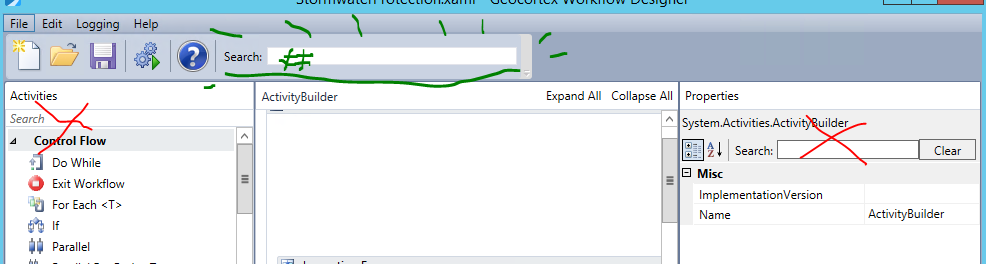 0
0 -
Thanks Zack. I went ahead and renamed this task as you suggested. Unfortunately I seem to be getting the same result. Have you had any experience working with this workflow directly? I am wondering if the workflow itself is flawed. All I really need to do is allow an end user to batch select features from one specific layer and then submit a report listing the selected features to a fellow staff member via email. I saw this workflow and thought it would do the trick. Extracting the data is a bit excessive for my needs, but in theory it would also do the trick. :) Was shooting for the quick n' dirty plug-and-play solution here. Looks like I might need to build the workflow from scratch if I can't get this to work. Any other advice or insight would be greatly appreciated! Thanks again for your time and assistance on this matter.
Cheers,
-Steve0 -
If you've renamed the correct task and aren't seeing the name update on your error message then you aren't updating the workflow that's being run in the viewer. I wasn't expecting the renaming of that activity to make any difference, to be clear; to make a difference we need to modify what the activity is actually doing! Can you tell us the two sides of that assignment activity, and possible the class of the left-hand value? 0 -
Sorry - let me clarify. So I've renamed the activity from, "Assign" to something like, "Assign GP". The error message I receive now cites this activity as "Assign GP" per the name provided so it seems to be referencing the correct activity. I've only tested it through the simulator though, although each time I've tested it within the viewer as well, I usually receive the same error result so I am assuming that if it fails in the simulator, it will fail in the viewer as well. :) Below is a screenshot showing the Select Extract Layers sequence where the problematic Assign activity appears. As you can see the top side is empty as it was listed as the first activity in the sequence. The bottom side feeds into a ForEach<String> looping activity. 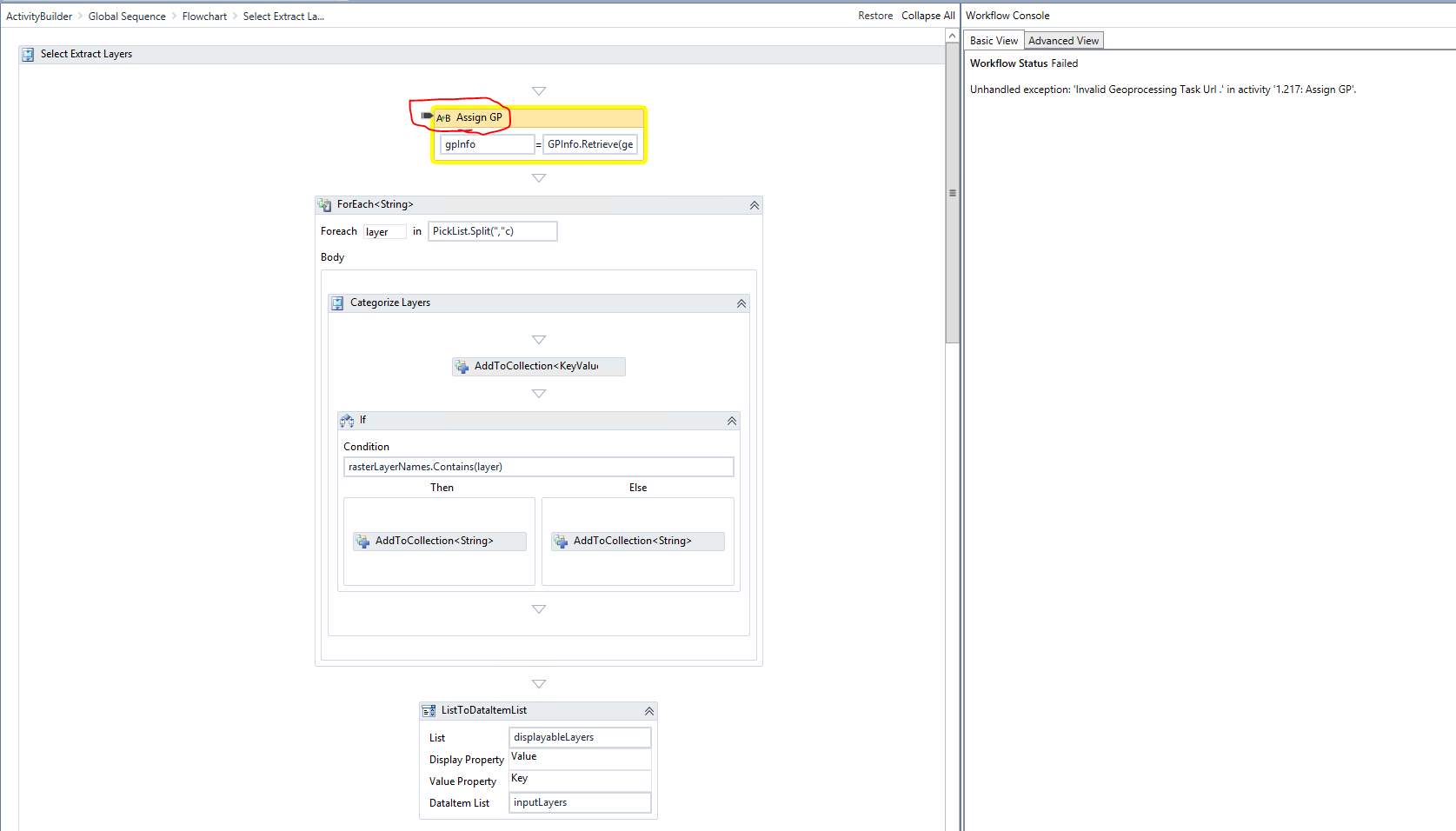
The class of gpInfo is "GPInfo" (variable type) with a defined scope of "Flowchart" and no default value. Again, to be clear, this is the way the sample workflow was configured and I haven't changed anything about it since attempting to use it. Hope this helps. Let me know if you require any additional information to continue your assessment. Thanks again Zack!
Cheers,
-Steve0 -
Well, I can't see the R-hand of the expression but it seems to me that the retrieve method may be running or getting the results of a geoprocessing task and that you're not supplying the correct url to the method to get this information. What are you trying to do with that gpInfo? Maybe you don't need it, or already have it elsewhere. 0 -
My understanding is it is trying to call the geoprocessing service via the URL that ends up being needed during the "Extract" sequence further down the flowchart. The flowchart looks something like this: 
I could try moving this activity down so that it initiates at the onset of the Extract sequence to see if this generates any other errors. I will report back with my findings.
Thanks,
-Steve0 -
Oh, I should clarify - the other sequences shown in the screenshot I provided above that are disconnected to the left are all part of an alternative workflow that I was in the process of building should I fail to get the LA sample one working. :)
Thanks,
-Steve0 -
Interesting result...
"Unhandled exception: 'Object reference not set to an instance of an object.' in activity '1.197: ForEach<String>'.
So it appears that even with Assign moved outside of this sequence, the workflow is having trouble getting what it needs for any activity in this sequence. Not sure what this means...0 -
Zack - in case you wanted to pull up the .xaml I am attempting to work with for yourself, you should be able to find it in the following location of your Geocortex instance:
\Program Files (x86)\Latitude Geographics\Geocortex Essentials\Public\REST Elements\Sites\Resources\Workflows\LA_Sample\ExtractAndEmail.xaml
Thanks,
-Steve0 -
Zack - the right hand of the expression reads, "GPInfo.Retrieve(geoprocessingTaskUri)". Under my Arguments, I have:
Name | Direction | Argument Type | Default Value
geoprocessingTaskUri | In | String | "http://[server url/name]/rest/services/Geoprocessing/ExtractDataAndEmailTask/GPServer/ExtractDataAndEmailTask"
Finally, the rest endpoint of the GP service resolves successfully and awaits user input for each of the required variables (field values have been deleted for the purposes of the screenshot below):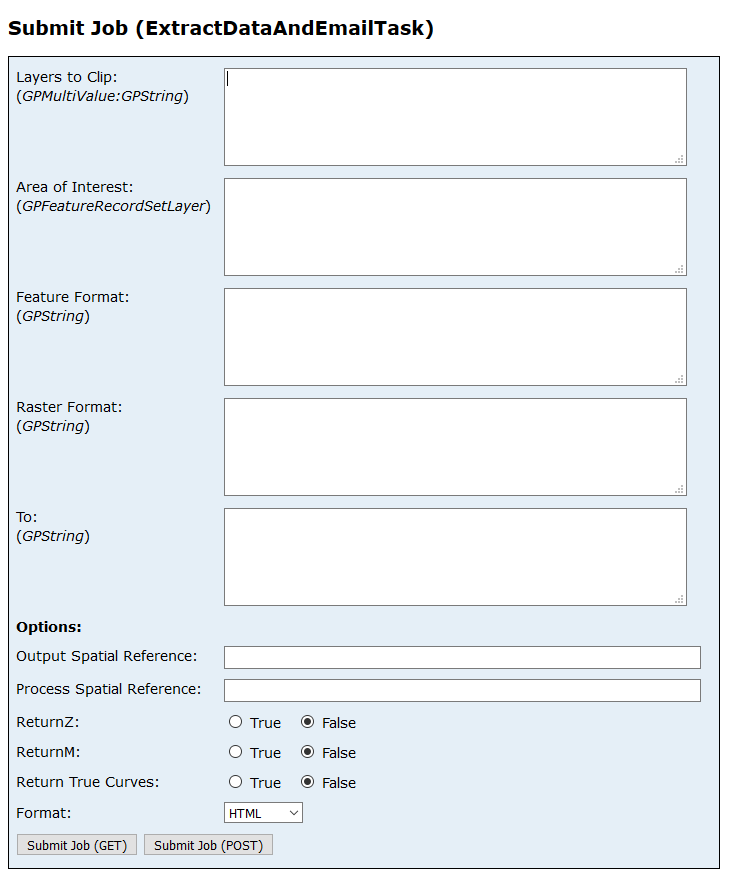
Our organization federates its ArcGIS Server site with our Portal so it asks me to login using my windows credentials prior to letting me access the Submit Job window. Just in case, I always ensure that I sign in to the geocortex viewer containing the workflow prior to doing a test run within the viewer and I've also added a "GetMapServiceInfo" activity immediately after the "ConfigureWorkflowContainer" activity just in case a token is required to access the GP service within the Geocortex workflow.
Thanks,
-Steve0 -
Sorry to keep bombarding you with replies - but I thought this last link might be useful in helping to better understand the geoprocessing task the workflow was designed to run...
http://desktop.arcgis.com/en/arcmap/latest/tools/server-toolbox/extract-data-and-email-task.htm0 -
Steve, have you considered using the "Geoprocessor" activity in the workflow designer? You may find that easier to work with, though the activity has some odd behavior for handling inputs on secureed gp services (which is a bit unintuitive IMO) I think that you'll be able to avoid any issue with the "custom parameters" argument.
Be sure to add a token to your request, whether using t; as you need to log in to access this tool the geocortex server will need to as well. I would also point out that your url isn't using ssl but your server may be forcing it with a reditrect from http to https, and given that you're getting an 'invalid url' error I would look at that.0 -
Thanks Zack. I do already have the Geoprocessor activity in the workflow. It is called within the Extract sequence (see below):
_img_ alt=""Extract" Sequence" src="https://latitudegeo--c.na53.content.force.com/servlet/rtaImage?eid=907f2000000bqJB&feoid=Body&refid=0EMf2000000cZgj" _/_img_
I will have to research more about this custom parameters argument you recommended. I've gone ahead and changed my 'GetMapServiceInfo' activity to 'GenerateToken' that I initiate early on in the workflow since I realized that the 'GetMapServiceInfo' activity is strictly for map services and not necessarily for geoprocessing services.
Any thoughts on the error that is now cropping up first ("Unhandled exception: 'Object reference not set to an instance of an object.' in activity '1.197: ForEach<String>') since my moving of the Assign activity further down the flowchart?0 -
That's a null reference error ("the thing that you want to play with doesn't exist"). Lucky for you, that can only be one thing in the case of a ForEach activity. Take a look at what you're iterating over and make sure that it should exist and have items to iterate by the time the ForEach is called. If everything appears to be in order, I'd log that iterable collection in the viewer and see what's there both 1) directly before the ForEach and (if applicable) 2) directly after the variable was created/filled. Look at those logs and see that your collection (or list, array, whatever) is what you expect it to be.
Something that I've been evangelizing lately is JsonConvert.SerializeObject([your collection]) for this task... with this you can stringify just about whatever you need for logging.0 -
I was having the same "invalid geoprocessingTaskUrl" error with this very same workflow. In the right side of the Assign task, I tried replacing the "geoprocessingTaskUri" argument from "GPinfo.Retrieve(geoprocessingTaskUri)" with the actual URL to my geoprocessing task in "" and it fixed the problem. Example: GPinfo.Retrieve("url to you geoprocessing task") 0
Bitte melden Sie sich an, um einen Kommentar zu hinterlassen.
Kommentare
16 Kommentare