How to add a color swatch/color picker in Display Form

I have a workflow that will query a parcel dataset by an attribute value (NBH) and my goal is to symbolize the result set by unique value (IMP_TYPE). I have the majority of the workflow copmlete in that it will select the specific neighborhood (NBH), get the unique improvement types (IMP_TYPE) within that neighborhood, and will loop through each result looking at the IMP_TYPE field. I want to be able to symbolize the graphics layer (featureSet) on this unique value and assign a specific color to each unique value, then set the renderer and update the graphics layer. I then want to be able to display in a form the unique values and their associated assigned color. For example, value R1 = Red, R2 = Yellow, etc... Is there a way to show this in a display form like the image below? Idealy I'd like the swatch to be a color picker but would settle for just the color swatch. Any thoughts or help would be greatly appreciated.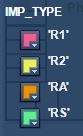
0
-

Here's something that just came to mind. It will only work if the number of colors is limited.
Add a combobox to the displayform, and add the colors you want to it. Then, add this to the custom styles file (Resources\Styles\Custom\DEVICE.css)option:nth-child(1) { background-color: red; } option:nth-child(2) { background-color: green; } option:nth-child(3) { background-color: blue; }
You will need to make the selectors a bit more specific, this example will work for any combobox/listbox on the page, maybe you could use the id of the SELECT tag, e.g. #formitem-avwfX2rt > option:nth-child(1) but I'm not sure if that's a static value.0 -

Clever move, Berend. I'd like to add that you can use hexadecimal representations here in addition to the css named colors (https://www.w3schools.com/cssref/css_colors.asp) ie: option:nth-child(0) { background-color: #7D64C8; }0 -
So, if I understand you correctly, the entire 'row' of the combobox/listbox will be the color specified in the css file? I suppose that would work but this would just be for visual purposes only, kind of like a legend. I'm currently adding the unique values to a Markdown item in the form (image below). Is there any way to add a color swatch next to the line item (next to 4.00 and 5.00)? 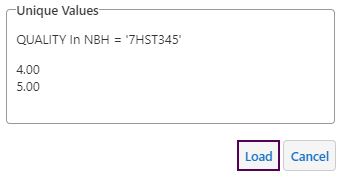 0
0 -
I haven't found a way to use colors in a markdown item, but I do know that the Description for a Group item recognizes most html tags. You could for instance use a table where the background color for the first column (TD) is set. 0 -
Hey Berend,
Thanks for the input, I'll give that a try.0
Bitte melden Sie sich an, um einen Kommentar zu hinterlassen.
Kommentare
5 Kommentare