Drop Down List Selected Index

I have populated my drop down list from a coded value domain. I am trying to set the default value to the 4th item in the list. No matter what number I enter, the list never defaults to anything. Is there something I'm missing to set this default value?
Thank you!
Belinda
-

Hi Belinda,
How are you trying to set default?
I just did a quick test using Amanda's tip:
"Open the designer, and go to File > New. From the list there, open
Samples - Get Coded Value Domain"
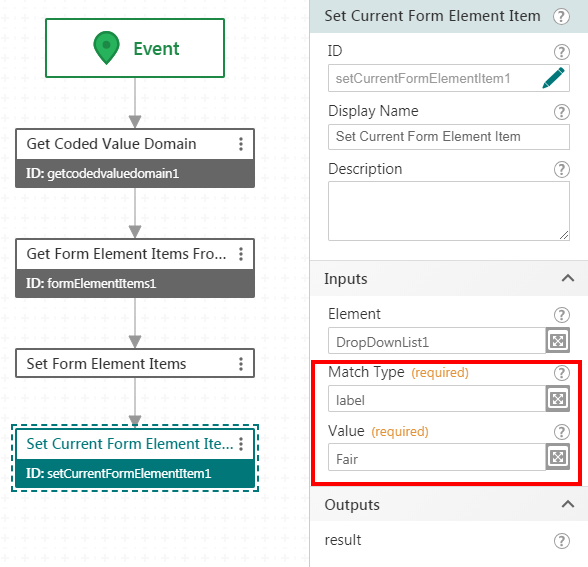
Then added "Set Current Form Element Item" to the dropdown list sub workflow
Thanks Stefan for that tip, https://communities.geocortex.com/workflow/s/question/0D5f2000055Jc1GCAS/set-dropdown-list-value-dynamically
See image for what I ended up with, and it worked.
I think in your case you could use
Matchtype = index, Value = 3 to get the 4th item.
or try these:
Matchtype = label, Value = the coded domain text
Matchtype = value, Value = the coded domain id
 0
0 -
Thanks Mark - that did the trick! I was trying to set it using the selected index option on the form and not in the sub-workflow.
 0
0
Bitte melden Sie sich an, um einen Kommentar zu hinterlassen.
Kommentare
2 Kommentare