Linked Maps Icon in Tablet

We have Linked Maps successfully configured in the Tablet shell, however, the icon that appears on the map is not displaying correctly. (We are using an iPad2) Any ideas why? It works fine in the Desktop shell.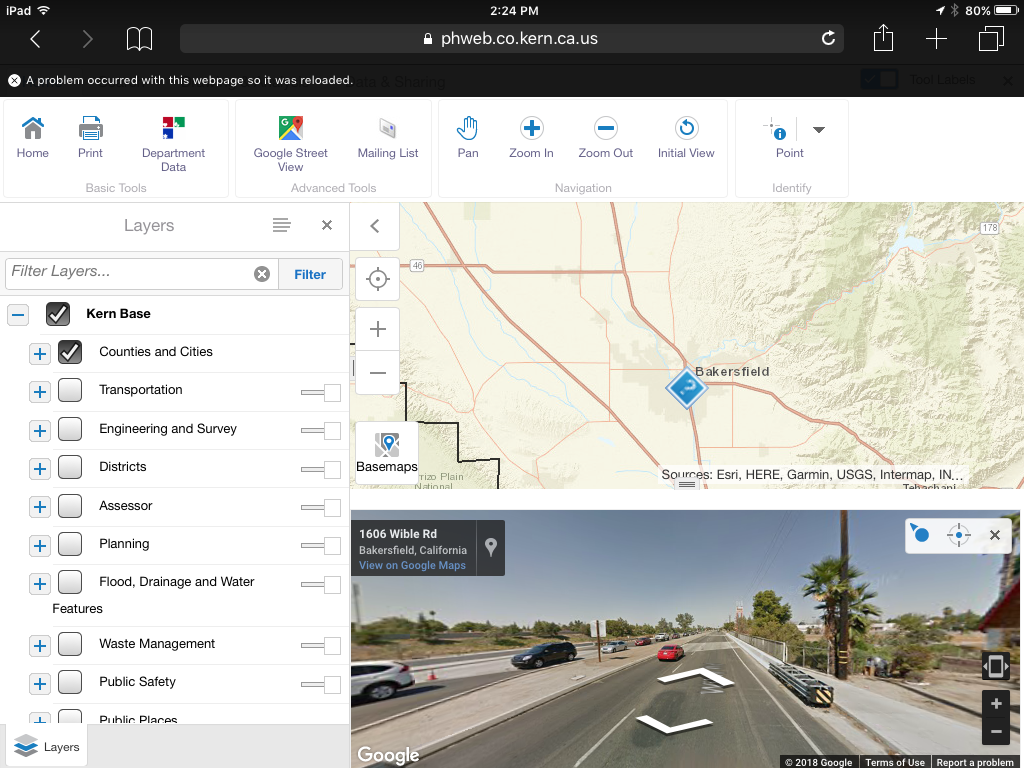
0
-
Hi Lisa,
Check the Tablet.json.js file, the "Integration" section. There should be a line like this -
"viewpointIndicatorUri": "Resources/Images/Icons/location-direction-red-32.png"
that determines the icon.
Regards,
Wayne Richard
Latitude Geographics Group Ltd.
Head Office: 300 – 1117 Wharf Street Victoria, BC Canada V8W 1T7
Tel: (250) 381-8130 | Fax: (250) 381-8132 | wrichard@latitudegeo.com
Developers of Geocortex web-based mapping software | www.geocortex.com
An Esri Platinum Business Partner0 -
Hi Wayne! Yes I double checked in the Tablet.json.file and everything appears to be correct. Could it be because the iPad is so old?  0
0 -
I wouldn't think so! We would hook the iPad up to Fiddler to see exactly what is happening -
https://docs.telerik.com/fiddler/Configure-Fiddler/Tasks/ConfigureForiOS
Feel free to try it yourself or submit a support case if you want help with it. Fiddler would show what file is being requested and what image is being sent back. If the correct image is being returned, the iPad is at fault. I wouldn't think this would be the case but you never know.
You can try the tablet emulator in Manager to see what it shows.
Regards,
Wayne Richard
Latitude Geographics Group Ltd.
Head Office: 300 – 1117 Wharf Street Victoria, BC Canada V8W 1T7
Tel: (250) 381-8130 | Fax: (250) 381-8132 | wrichard@latitudegeo.com
Developers of Geocortex web-based mapping software | www.geocortex.com
An Esri Platinum Business Partner0
Bitte melden Sie sich an, um einen Kommentar zu hinterlassen.
Kommentare
3 Kommentare