Why do Get Feature Attribute Value (and Values) come back as undefined?

First of all, I am new to workflows, so I want to apologize for the basic question. I am trying to develop a workflow that lets a user select multiple points and make a bulk edit for a few attributes on all of the points. I'm doing this using a display form to select a geometry. Use that geometry in a Query Layer to select the points from a feature service, then I send it into a Get Feature Attribute Values (I have also tried Get Feature Attribute Value). I have several steps after this, but as of now, I seem to be stuck here. In the logs, it shows that the Query Layer features do go into the Get Feature Attribute Value, but the outputs continue to show up as "undefined". I have also tried to just send the Query Layer features into Set Feature Attribute and I get the same result. I do know the Query Layer is working. If I connect a Show Results, I do get a result to show up representing all of the selected features. Any suggestions anyone might have would be much appreciated. Thanks.
-
Hi Tara,
How are you checking the results from Get Feature Attribute Value(s)? Have you used an Alert or Log on something like this?
=$attributeValues1.value
or
=$attributeValues1.values[0]
How about the name of the attribute in Get Feature Attribute Values? Does it match the name on ArcGIS Server, including the capitalization?
If you'd like to share the workflow we could take a quick look. If it's shared publicly in AGOL you could post the link. Otherwise In workflow designer you can use File > Export to download a json file that can be attached here.
0 -

You have set the Output Fields property of the Query Layer to "*"? And I think the
field name for the Attribute property of Get Feature Attribute Value is case-sensitive.
0 -
I have used both logs as well as an alert. And have set them up multiple ways. Often times, one of the attributes I want to edit contains a Null value, so I don't expect something to show up.
The name of the attribute in Get Feature Attribut Values does match (including syntax) the name on the REST end point.
Also, the Output Fields property of the Query Layer is set to "*".
I know I'm missing something pretty obvious here! The joys of learning :).
The workflow has been made public. It can be accessed here https://bozeman.maps.arcgis.com/home/item.html?id=2c0548efd916404296820f9c691b8540
The REST end point for the feature service is also available. It is currently hitting a test database/service. https://gisweb.bozeman.net/cob/rest/services/Internal/Forestry_Editible_Test/FeatureServer/0
Thank you both for the responses.
0 -
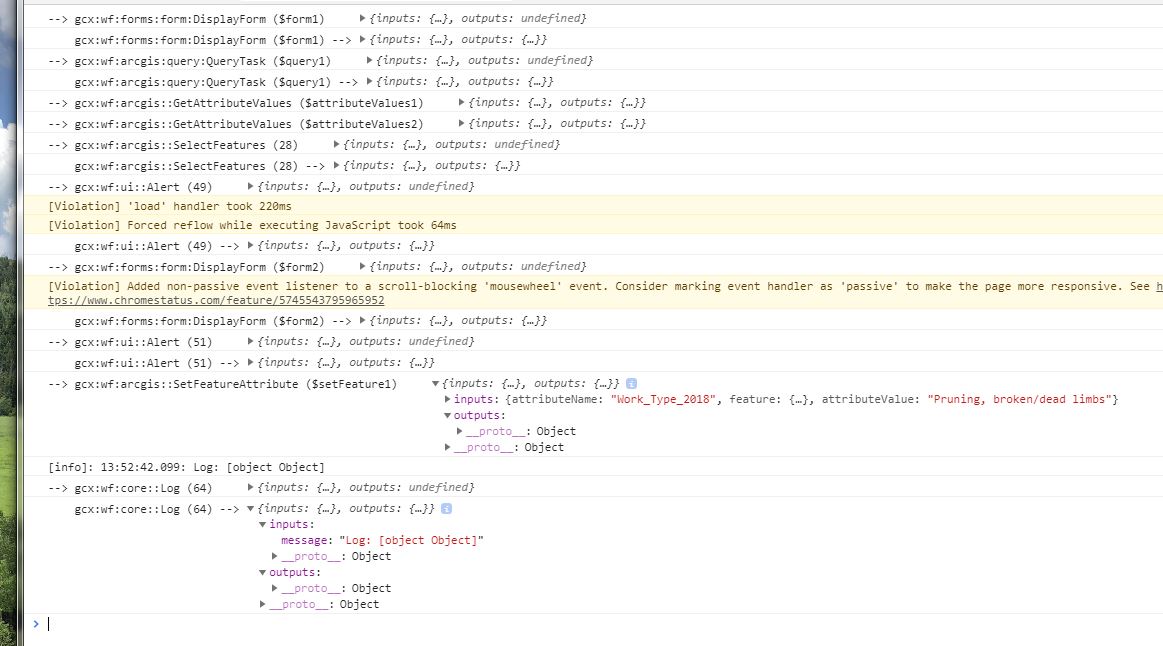
I have made a little progress, but now I'm just getting the feature to update as [object Object].
 0
0 -
Seems like you're on your way now. I think the original issue was probably that it was checking the value of $attributeValues1.values, which is a list, rather than $attributeValues1.values[0] or $attributeValues1.value, which is the first item in that list. You can put the whole list (=$attributeValues1.values) in a Log as-is, but not an Alert.
Your last Log activity won't work because $setFeature1 isn't a text value, so it can't be combined with the "Log: " string. The Set Feature Attribute activity also doesn't have any useful outputs to show, but what you could do is log =$query1.feature to check the feature that was just updated.
Once you've got everything else set, you'll probably want to add an Update Features activity to the end of the workflow to update your feature layer with the changes you've made to =$query1.features. It looks like for now you're just testing updating the first feature, and then once you've got that working the ForEach loop you've got in there will be the way to go to get all of them at once :)
0 -
hat's it! I didn't realize I needed the Update Features activity to follow the Set Features activity. I have it working now. Thank you!
0
Bitte melden Sie sich an, um einen Kommentar zu hinterlassen.
Kommentare
6 Kommentare