Unable to access secured services using same methodology as in GW5 - Secured Query workflow.

I have been attempting to access a secured service using a Get Layer, Parse URL, and a Query Layer. I am getting a token to come through from the layer1 as well as the Parseurl1 (see below screen shot). I keep getting an error that says "
"[WF: activity error] No token available for service https://gisweb.bozeman.net/cob/rest/services/Internal/Forestry_Editible_Test/FeatureServer/0/query"".
I'm obviously missing something. Does anyone have any ideas what that might be? Thanks
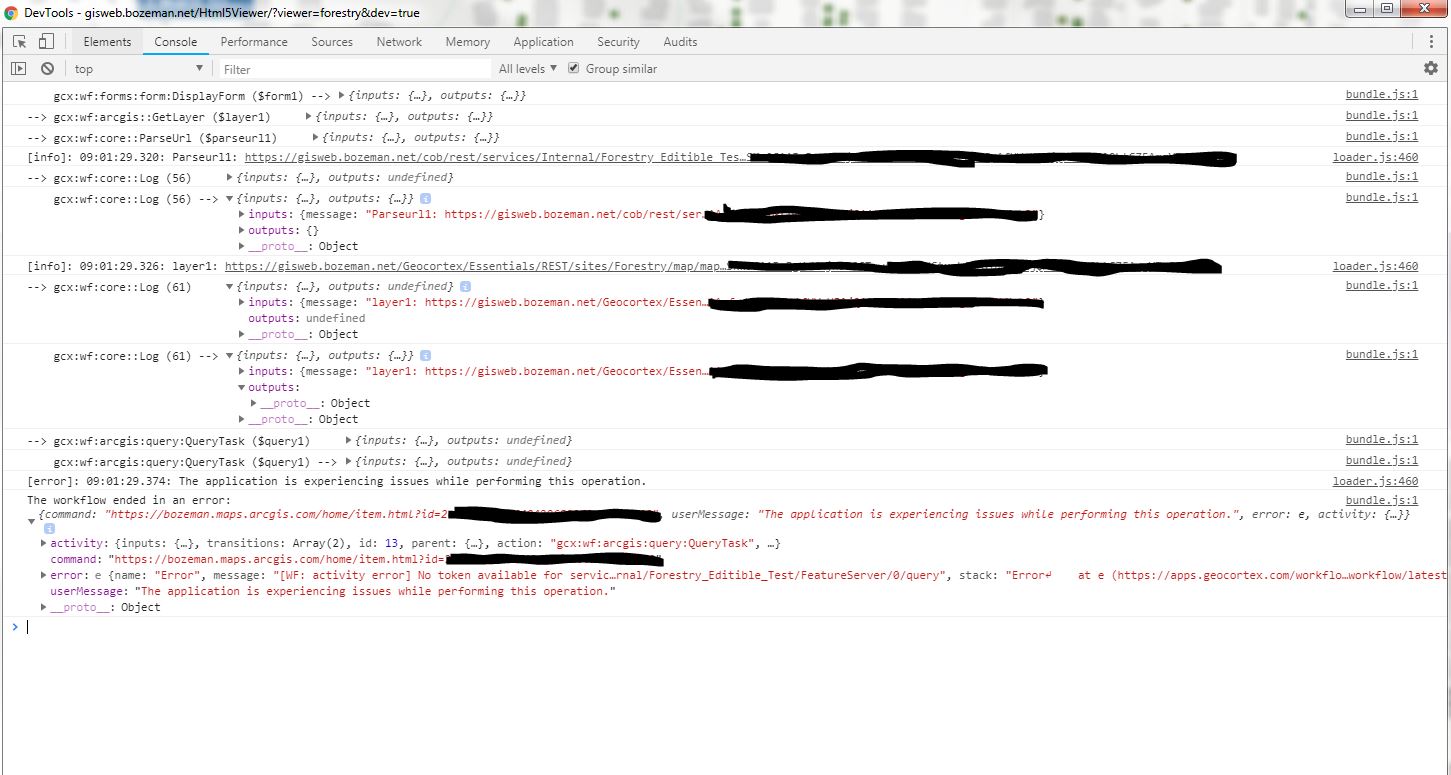
-
Also, I get the attached message when I go to the link provided with $layer1.layer.url. I don't understand why it says I'm unauthorized to proceed?
0 -

Hi Tara,
In the first screenshot that you provided, you can expand the outputs from the GetLayer and ParseUrl activities by clicking the small grey arrow to view the inputs and outputs from those activities, which may help in determining if the correct layer or sublayer information was returned. The Layer ID should correspond with the ID of the layer within the site's REST endpoint.
Thanks, Stefan
0 -
I have been doing that, and yes, it does. I was trying to limit the size of the screen shot. It does appear the correct layer id is being collected. I'm wondering if it has to do with the authentication used within Geocortex and our ArcGIS Server? We do not have a federated Portal at this point. Will that affect the token authentication?
0 -
The authentication shouldn't make a difference if the credentials are properly set in the workflow for your token-secured map service. The error seems to indicate that it wasn't able to obtain a token.
0 -
Hi Tara, were you able to resolve you're issue? I have the same error and it seems that although the user is signed into the Viewer, their GC permissions for certain layers are not recognized within the workflow.
My workflow has been configured to run via the Context Menu for a Layer. Due to this, it uses the Get Workflow Inputs activity to get the layer selected. I am using the output Layer URL to then Query the layer.
However the URL returned is the Essentials Rest URL for the layer, not the ArcGIS Server Rest URL. Since only certain roles have permissions to these layers, it would require a token to access this. I assumed the workflow would be able to recognize this and include the token automatically, but this doesn't seem to be the case.
I was able to run a Fiddler to grab the GC token (not the ArcGIS token) and apply it to the URL parameter of my Query Layer activity. This worked, but unfortunately this isn't a long term solution. It only confirms my theories.
Is there a way to authenticate the user within the WF5 workflow to return the token dynamically?
0 -
Hi Jennifer,
If you're using an Essentials Rest URL for the query, try adding a Get Essentials Site activity to the workflow. It looks like you should be able to get the user's current Essentials token from the output: =$site1.site.principal.tokens.site
0 -
Wonderful, that did the trick Amanda! Thanks for the information.
0
Bitte melden Sie sich an, um einen Kommentar zu hinterlassen.
Kommentare
7 Kommentare