Should "AddMarkup" work like it does in essentials?

Getting error when using "run command" activity with "AddMarkup" command and point geometry picker as command parameter?
?
-
Here is the error:
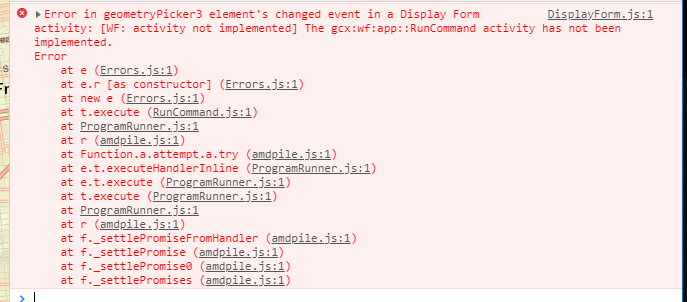 0
0 -

Are you running the workflow from somewhere other than an Geocortex viewer (eg, Web AppBuilder or the workflow Sandbox)? The Run Command only works for Geocortex viewers.
See https://docs.geocortex.com/workflow/latest/help/Default.htm#wf5/help/activities/run-command.htm
If you're developing specifically for WAB or GVH and don't want to see activities that aren't relevant for your viewer, you can use (Info > Deployment) in workflow designer to filter the toolbox.
0 -
Amanda, We, here at the state of Nebraska NDOT, work in partnership with the OCIO (office of the chief information officer) to set up our applications. I am not sure if they have everything set up correctly, and it is not their priority right now. I am still in the process of testing this out. Thanks, Chris. 0 -
I am running it in the workflow in sandbox and in geocortex viewer. I have tried creating a mark up with the run command and creating the symbol from Json in the workflow. I can not get the image created from the json or run command in sandbox or the viewer. Can you see a problem with my workflow?
{"components":[{"steps":[{"inputs":{"layerId":"mylayer","features":{"accessors":["$createfeature1"],"annotations":[{"kind":"idref","index":0,"count":15}],"code":"$createfeature1.feature","source":"$createfeature1.feature"}},"id":20,"action":"gcx:wf:arcgis::AddGraphicsLayerFeatures","title":"Add Graphics Layer Features","position":"430,440","description":"Specify a layer id in which to add the graphic features. If the layer already exists it will be added to the layer. If not it will be created.","name":"addgraphicslayerfeatures1"},{"inputs":{"text":"\"The Value is True\""},"transitions":[{"inputs":{},"id":12,"target":{"id":11},"position":"-140,350 -140,400","sourceConnector":"bottom"}],"id":7,"action":"gcx:wf:ui::Alert","position":"-260,320","title":"Alert"},{"inputs":{"commandName":"\"AddMarkupGeometry\"","commandParameter":{"accessors":["$form1"],"annotations":[{"kind":"idref","index":0,"count":6}],"code":"$form1.state.geometryPicker1.value.geometry[0]","source":"$form1.state.geometryPicker1.value.geometry[0]"}},"id":11,"action":"gcx:wf:app::RunCommand","position":"-260,400","title":"Run Command"},{"inputs":{"condition":{"accessors":["$form1"],"annotations":[{"kind":"idref","index":0,"count":6}],"code":"$form1.result === \"runCommand\"","source":"$form1.result === \"runCommand\""}},"transitions":[{"id":27,"target":{"id":7},"branch":"true","position":"-70,260 -140,260 -140,320","sourceConnector":"left","targetConnector":"top"},{"id":30,"target":{"id":29},"branch":"false","position":"50,260 150,255","sourceConnector":"right"}],"id":25,"action":"gcx:wf:core::If","position":"-70,230","title":"If"},{"inputs":{"form":{"accessors":[],"code":"resources.forms[values.id]","values":{"id":5}}},"transitions":[{"id":26,"target":{"id":25},"position":"90,160 90,210 -10,210 -10,230","sourceConnector":"bottom"}],"id":4,"action":"gcx:wf:forms:form:DisplayForm","position":"-30,40","title":"Display Form","name":"form1"},{"inputs":{},"transitions":[{"inputs":{},"id":6,"target":{"id":4},"position":"90,10 90,40","sourceConnector":"bottom"}],"id":3,"purpose":"start","title":"Start","position":"0,-50"},{"inputs":{"text":"\"the value is false\""},"transitions":[{"id":31,"target":{"id":18},"position":"390,255 410,255 410,60 550,60 550,80","sourceConnector":"right","targetConnector":"top"}],"id":29,"action":"gcx:wf:ui::Alert","position":"150,240","title":"Alert"},{"inputs":{"json":" ={\n \"type\": \"esriSMS\",\n \"style\": \"esriSMSCross\",\n \"color\": [255,255,0,255],\n \"size\": 20,\n \"angle\": 0,\n \"xoffset\": 0,\n \"yoffset\": 0,\n \"outline\": \n {\n \"color\": [255,255,0,255],\n \"width\": 4\n }\n }"},"transitions":[{"inputs":{},"id":22,"target":{"id":16},"sourceConnector":"bottom","targetConnector":"top","position":"550,190 550,250"}],"id":18,"action":"gcx:wf:arcgis::SymbolFromJson","title":"Symbol From JSON","position":"430,80","description":"Create a SimpleMarkerSymbol object from JSON","name":"symbolfromjson1"},{"inputs":{"symbol":{"accessors":["$symbolfromjson1"],"annotations":[{"kind":"idref","index":0,"count":16}],"code":"$symbolfromjson1.symbol","source":"$symbolfromjson1.symbol"},"geometry":{"accessors":["$form1"],"annotations":[{"kind":"idref","index":0,"count":6}],"code":"$form1.state.geometryPicker1.value.geometry[0]","source":"$form1.state.geometryPicker1.value.geometry[0]"}},"transitions":[{"inputs":{},"id":24,"target":{"id":20},"position":"550,380 550,440"}],"id":16,"action":"gcx:wf:arcgis::CreateGraphic","title":"Create Feature","position":"430,250","description":"Create an esri.Graphic object by combining a geometry (esri.Point) and a symbol (esri.Symbol)","name":"createfeature1"}],"id":2}],"forms":[{"defaults":{},"elements":{"header":{"type":"Header","section":"header","title":{"markdown":"Form Title"}},"geometryPicker1":{"enabled":true,"type":"GeometryPicker","title":{"markdown":"Geometry Picker"},"prompt":{"markdown":"Add Location"},"itemLabel":{"markdown":"Location"},"format":"point","size":1,"index":0,"require":true,"autoActivate":true},"footer":{"enabled":true,"type":"ButtonBar","items":{"0":{"index":0,"label":{"markdown":"Run Command"},"value":"runCommand","validates":true,"default":true},"1":{"index":1,"label":{"markdown":"Json Image"},"value":"jsonImage","validates":false}},"section":"footer"}},"id":5}],"designerVersion":"5.7.0+65","start":{"id":3},"licenseInfo":{"licenseeId":"00130000007v2v4AAA"}}
Thanks,
Chris.
0 -
Getting this error in the console:
0 -
 0
0 -
Hi Chris,
Thanks for including your workflow.
For the Markup command, try removing the double quotes from "AddMarkupGeometry". If you don't use an = sign, workflow automatically assumes that most inputs are strings, so it's thinking that those double quotes are part of the command's name. (note this command should work in your Geocortex HTML5 viewer, but it won't work in the workflow sandbox)
For the Get Symbol From JSON activity, try removing the = symbol from the start of your input.
This activity should accept a json object or a string, but it looks like there are issues when you use an object and have double quotes on the property names. The solution is to either
- remove the = to make it a string input
- or leave the = so that it stays as an object input, but remove the double quotes from all the property names like this
={
 type: "esriSMS",
 style: "esriSMSCross",
 color: [255,255,0,255],
 size: 20,
 angle: 0,
 xoffset: 0,
 yoffset: 0,
 outline:
  {
  color: [255,255,0,255],
  width: 4
  }
 }
0 -
Amanda,
Your answer gave me valuable insights to how the software works. I was able to get the graphics created in the viewer.
Thank you,
Chris.
0
Bitte melden Sie sich an, um einen Kommentar zu hinterlassen.
Kommentare
8 Kommentare