GeoCortex Upgrade would not run

We are having some issues upgrading our Goecortex Essentials from 4.6.3 to 4.10.1. When we executed the msi file we got the error (Screenshot below)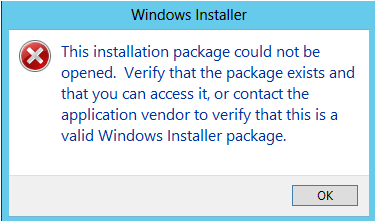

At first I was thinking it could be security issue and when we tried running it in CMD in Admin mode, off the local drive (C), it says "Access denied" . We also tried in a few diff places on C, but got the same error pretty much in all places, so that's why I think security issue.
Im just posting it here incase anyone has come across similar issue and I would be glad to know how they resolved it
0
-

Hi Irene,
If you right click the icon is there an option to run it as administrator? I would think that it would give the same results as using the CMD window but you neven know, it may provide more info. You may also want to try downloading it again, in case the download was corrupt.
Regards,
Wayne Richard
Latitude Geographics Group Ltd.
Head Office: 300 – 1117 Wharf Street Victoria, BC Canada V8W 1T7
Tel: (250) 381-8130 | Fax: (250) 381-8132 | wrichard@latitudegeo.com
Developers of Geocortex web-based mapping software | www.geocortex.com
An Esri Platinum Business Partner0 -
Thanks Wayne, I did use the right-mouse-click option to run it as Administrator and still got the same error. I would take up your second suggestion and to try downloading the file again and see if it would make a difference. 0 -
Hi Irene,
Just following up on your post, did you manage to get past the error?
Regards,
Wayne0 -
Yes! it was resolved. We contacted our IT dept and it looks like they elevated our permission level to the server and that kind of solved the problem.
I am supposing that the issue came up because we probably did not have enough permission to run th msi file on our server.0 -
Excellent, thanks.
Wayne Richard
Latitude Geographics Group Ltd.
Head Office: 300 – 1117 Wharf Street Victoria, BC Canada V8W 1T7
Tel: (250) 381-8130 | Fax: (250) 381-8132 | wrichard@latitudegeo.com
Developers of Geocortex web-based mapping software | www.geocortex.com
An Esri Platinum Business Partner0
Bitte melden Sie sich an, um einen Kommentar zu hinterlassen.
Kommentare
5 Kommentare