'No results found' when adding map service, but service is running.

I'm setting up a Geocortex site on a new server and all of the sudden I cannot add new map services. When I paste the service URL and click serach it returns "No results found", but the service clearly exists and is running just fine. I've tried restarting the services, restarting Geocortex, nothing helps. Does anyone know what's going on here? I'm using GE 4.10.3.
0
-
Hi Jessica,
Are you adding an https service? There could be a connection problem. Try clicking F12 after the issue happens and look for errors in the dev tools - console section. Also, have a look at the Manager logs -
C:\Program Files (x86)\Latitude Geographics\Geocortex Essentials\Default\REST Elements\Manager\App_Data\Logs\SYSTEM.*
Regards,
Wayne Richard
Latitude Geographics Group Ltd.
Head Office: 300 – 1117 Wharf Street Victoria, BC Canada V8W 1T7
Tel: (250) 381-8130 | Fax: (250) 381-8132 | wrichard@latitudegeo.com
Developers of Geocortex web-based mapping software | www.geocortex.com
An Esri Platinum Business Partner0 -
Hi Wayne,
Yes, it's https, and so are all of the others I've added previously. Here's what the console section looks like-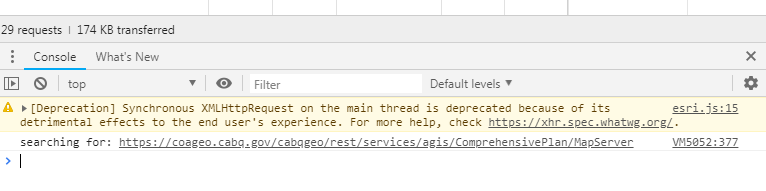
I looked at the system logs and it seems to be a problem with a token. "The error was: Token Required". This is the first time I've worked with https in Geocortex. Is there something I have to do to have it save my credentials?
Thanks,
Jessica0 -
It sounds like the service is secured on the ArcGIS side. If that's the case, you'll need to add it as a "Service Connection" in Essentials Manager -
https://docs.geocortex.com/essentials/latest/admin-help/Default.htm#ge/admin/service-connections.htm#add-an-arcgis-server-service-connection
If it is, you'll need to follow one of the authentication methods in the help section.
To test to see if it is unsecured, paste the URL into a browser and see if it loads OK and you are not logged in (look at the top right corner). If you are logged in automatically, try logging out.
Regards,Wayne
0 -
That did the trick. Thank you Wayne! 0
Bitte melden Sie sich an, um einen Kommentar zu hinterlassen.
Kommentare
4 Kommentare