Setting CSS style for form elements at runtime in HTML5 viewer

Is there a way to dynamically set the CSS style for Display Form elements (e.g., CheckBoxFormItem.Text) at runtime?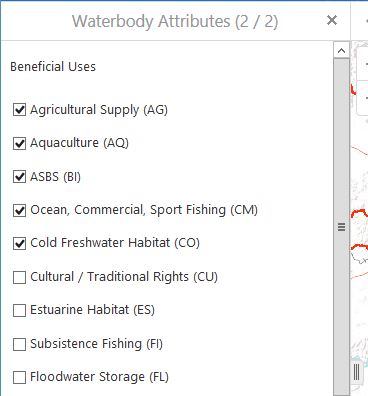
In a workflow I'm developing for the HTML5 viewer, I have a form that contains a list of Check Boxes that are dynamically checked at runtime based on query results:
I would like to highlight certain of these checkboxes based on the results of a second, separate query. My thought is to create a custom CSS class for the highlighted labels (these are currently set in the .form-label class in common.css) and apply this to the applicable check boxes at runtime. However, while I can set the check box label using form.Find(Of CheckBoxFormItem(<checkboxID>).Text, I don't see any way to set the specific styling of that text.
Any assistance or examples that can be provided to accomplish this would be greatly appreciated. Thanks!
Jeff
0
-

I would look into WF5 and the "Inject CSS Activity", I'm not sure if it will help but it's more likely to work over WF4.
Regards,Wayne
0
Bitte melden Sie sich an, um einen Kommentar zu hinterlassen.
Kommentare
1 Kommentar