Changing Basemap Switcher with CSS

I recently discovered css files and started creating new color schemes for my web maps. I've gotten to where I can change the color of almost anything I want, but one thing I cannot figure out is how to change the color of the little gap between the basemap switcher button and the flyout menu. It wasn't so noticable with the light blue color scheme I made, but now that I'm making a dark grey color scheme, the little white space is really bothering me. I've been trying on and off for months to change the color or even get rid of the gap to no avail. Any suggestions would be much appreciated. 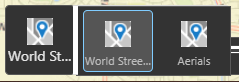
Thank you,
Denise
0
-

Hi Denise,
Try this to see if it works. Change the colour to what you need.
.map-bottom-left .flyout-menu-collapsible-area:after {
background: black;
}
Thanks,
Marion.0 -
Marion,
Thank you so much! That did the trick!
However, I did notice that the flyout menu floating area seems to sit one pixel lower than the floutmenuactive tool button. Is there any way to raise the floating area a pixel? If not, then that's ok though. I am very grateful that you helped helped me finally get the color of that gap changed!
Thanks,
Denise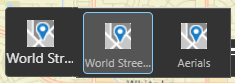 0
0 -
HI Denise,
Just testing on the dev tools, try this - it should help with the pixel on top, but not sure about the bottom:
.flyout-menu .toolbar-item.toolbar-group {
background-color: black;
}0 -
Marion,
Thank you for your response! I tried using that code and removing part of the code I had before, but it left white space at the bottom of the flyout menu.
However, I discovered that I had the wrong element colored in! Before, I had the following.
div.flyout-menu-floating-area {
background-color: #333333;
border: 1px solid #595959;
}
After trying a few different things I discovered that the following fixed the problem.
div.flyout-menu-collapsible-area.flyout-menu-tools.bound-visible {
background-color: #333333;
border: 1px solid #595959;
}
Now it's all lined up properly and, most importantly, there's no white gap between the button and the flyout menu!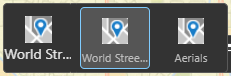
Thanks for all your help!
Denise0 -
Hi Denise,
I'm glad you got it working. There are so many selectors in css, it is hard to get the right one!
Marion.0
Bitte melden Sie sich an, um einen Kommentar zu hinterlassen.
Kommentare
5 Kommentare