Sample workflow to copy a feature from one layer to another

Hi. I was wondering if anyone out there have a sample workflow that can be used to copy a feature from one layer and paste it into another layer?
Thank you,
Nataliya
-

Hi Nataliya,
I created a workflow that allows the user to copy either a point or polygon from a source layer to a different layer.
In the form I ask:
Step 1 - Choose the layer they want to copy from
S?tep 2 - Choose the layer they want to copy to. This list is filtered based on the first list because they can't copy a point into a polygon layer and vice versa.
Step 3 - I use a geometry picker to get the user to pick the item they want to copy. I restrict it to 1 geometry because later on they fill out the attributes.
Once they press OK, I use a switch to determine which path to follow for the query layer.
Within a container, I then run a Query layer step, to get the fields from the source feature I want to copy the attributes from, using the geometry parameter from the form
=$form1.state.geometryPicker1.value.geometry[0]
I then present another form for the user to enter the remaining attributes. When the user presses OK on that form, I then:
1) Run a 'create feature' step (ID ContainerPolyFeature) -
Attributes - from the form they just filled out and the previous query result
Geometry - from the query result geometry output
2) Run a 'Add Feature' step -
The Features are the =$ContainerPolyFeature.feature (the previous step's name)
3) I then check the Add Feature step was successful.
4) If it was, I run a 'Get Layer' step so that I can then
5) Run a 'Refresh Layer' step to show the new feature on the map.
If you need any further details on particular steps let me know. My workflow isnt public so I can't share it.
Belinda
0 -
@Belinda Kerr? . Thank you for your help. I still have anissue with my workflow, and it seems to be failing on the 'Add Feature' step, and i don't really understand why does it fails. I don't know if you would be willing to take a look at my workflow and see if you can find any issues with it.
Also, I know you mentioned that your workflow is not public, but maybe you could send me a screenshot of your 'Add Feature' setup? Thank you, I very much appreciate any help. Nataliya
0 -
?Hi Nataliya,
My add features step is below...
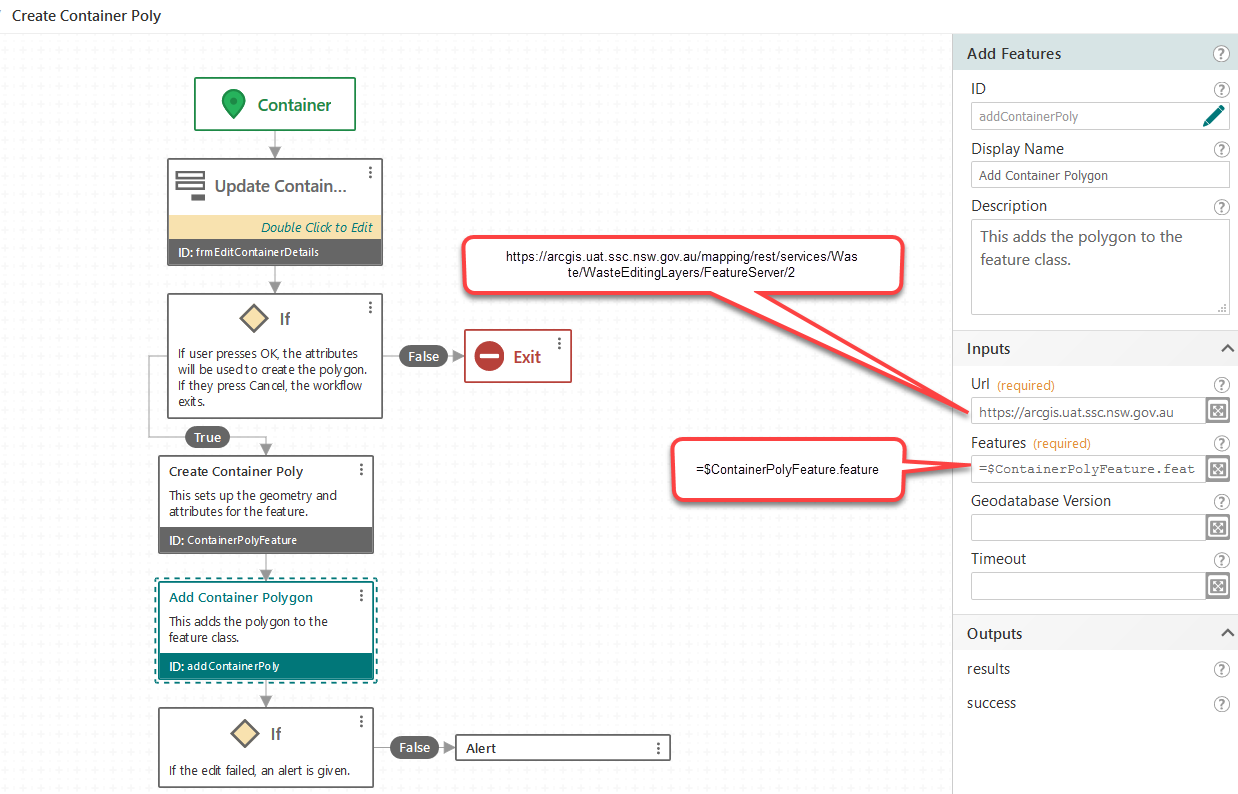 0
0 -
Belinda. Thank you you help.
My set up for add feature container look the same. There must be something else that I am doing wrong? Here is a link to my workflow, if you have a minute to look at it, I would really appreciate it. Thanks, again.
https://omaha.maps.arcgis.com/home/item.html?id=62963d8b78294c91930cac75051ef27e
Nataliya
0 -
One thing I would try is setting your output fields in the query layer step. Currently your setting is empty. You may have a field that requires no null values or to be unique and the information you are setting in the create feature step may be erroring on that.
0 -
Nataliya,
I took a peek at your workflow. The data that you're attempting to upload is in a completely different schema from the service being uploaded to. When you get the geometry problem figured out, which is why you aren't getting anything to upload by the way (polygons in a point feature class ain't gonna happen), you still won't have any attributes in your uploaded feature because they are fields from the selection and esri won't do anything with them for your upload feature class.
Good luck.
0
Bitte melden Sie sich an, um einen Kommentar zu hinterlassen.
Kommentare
6 Kommentare