Add value to geometry picker

Is it possible to add a point value to the geometry picker? I am trying to take coordinates from a text input box, add a graphic to the map, then have the geometry from that graphic populate the geometry picker. I tried using the set for element property, with no luck. Any thoughts?
-

Set Form Element Property is the correct activity for you. You need to set the two properties element's .value and its .state property. In order to figure out what you need in there, I recommend setting up a test form in a scratch workflow, adding some points to a geometry picker element, and then examining those properties in the dev console after submitting the form (form.state.geometryPicker.someProperty).
If I recall correctly, the .value property will need a couple of properties including but not limited to your point object in the .value.geometry property. The .state property is an array of objects for the list in the form, each item containing a .content property with that point geometry.
0 -
Hi Zack, I followed your advise, and added in 2 set form element property. Both references the element and I used value.geometry, the other state.content.
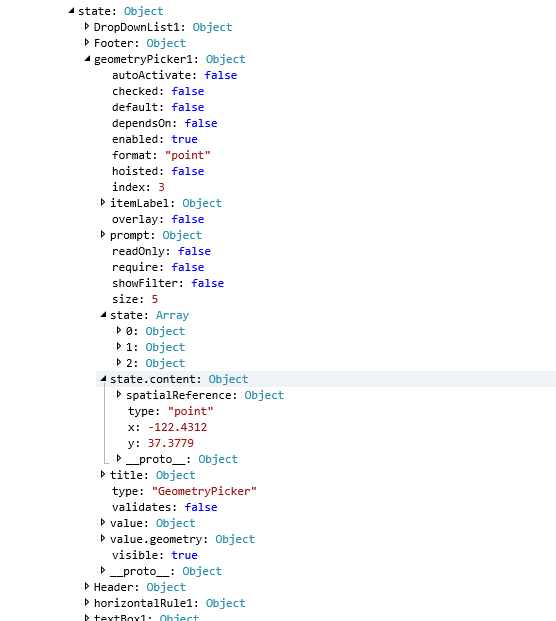
It adds everything in console but as you can see instead of putting the data in state then content, it creates a new line called state.content. See the attached image. Any thoughts?
 0
0 -
You need to set the value of the .state property to be an array of objects, each of which will itself need a property called "content".
Pseudocode for this might look like "form.state = [{content: point1},{content:point2}]".
Looks like you need to take a look at the value property as well, which should be an object. You appear to be trying to set the object's properties by accessing them through the Set Element's "Property Name" field, but it doesn't work like that. The Property Name field only takes a string for the name of the property, that must be how you've ended up with these strange properties in your form.
0
Bitte melden Sie sich an, um einen Kommentar zu hinterlassen.
Kommentare
3 Kommentare