Custom OAuth2 as an Identity Provider for Essentials

Hi there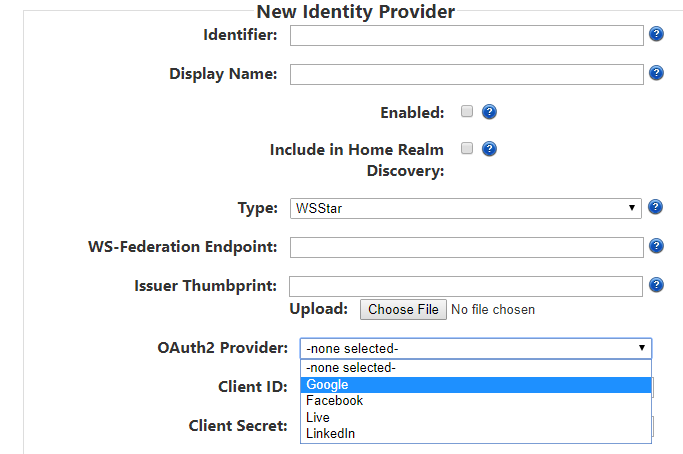 I'm looking for a documentation how to setup a custom OAuth2 provider with own Login URL, Client ID, Client secret, etc..
I'm trying to configure new identity provder for Esssentials using OAuth2. The current adminitstrator pages of Geocortex Identity Server allows me to add only predefined OAuth2 types.(Google, LinkedIn, etc as per screenshot)
I'm looking for a documentation how to setup a custom OAuth2 provider with own Login URL, Client ID, Client secret, etc..Any help pointing me to the right direction would be greatly appraciated.
0
-
We integrated Auth0 into Geocortex. It took us nearly a year and a very well knowledge IT, Programmer and Security expert as well as me a Geocortex expert.
We started with this article below as our core knowledge set but it ended up having to be very customized. Also note that we are having to write middleware for Auth0 so Geocortex can leverage "Groups" & "Users". Saving projects and using collaboration channels by default are either "All" or "No User" unlike the Microsoft AD integrations.
Feel free to PM me and maybe we can help more.
https://support.geocortex.com/essentialsGSCkba?sub-nav=kba&main-nav=essentials&#!/feedtype=SINGLE_ARTICLE_DETAIL&criteria=BESTANSWERS&id=kA3f2000000fxSkCAI0 -

@Dylan
We have setup auth0 and are seeing the same situation you mentioned about "All" or "No User." I am curious if you were able to get a working middleware for Auth0 in place to pull roles, groups for use in saving projects and collaboration?
--Marc0 -
Marc - We never did. The development was cost prohibitive and technical debt too high. It also looks like Groups might not work as it only works from Windows AD. So it might have not even been possible which is why we did not risk the time or $. 0 -
We never got "Users" to show either. It's all form the Auth0 Tenant or nothing. We even tried using different Apps & Security Stores in Auth0 and could only get Geocortex to work with 1. 0
Bitte melden Sie sich an, um einen Kommentar zu hinterlassen.
Kommentare
4 Kommentare