Having difficulty with the Send Email activity

I can't figure out what my issue is, but every time I try to run a Send Email activity I get the "Alert: The application is experiencing issues while performing this operation."
I have tested the json configuration through a script and it seems to work, so I don't think that is the problem. I have also tested all other elements of my workflow and they work fine, but as soon as I add the "Send Email" activity to the server-side workflow, I get the error. Does anyone have an example of a working Send Email activity they could share?
-
Hi,
Were you ever able to resolve this issue? We're having the same sort of problem. (Can I ask what method you used to test the json config file outside of WF5?)
Thanks!
James
0 -
Hi @James Auld?,
Unfortunately we were never able to resolve this issue, and after a lot of working with geocortex support they ended up filing the issue as a bug in Sept 2019. I believe the method we used to test the json config file was to write a script that sent an email using the exact configuration and credentials we had in that file, and the script executed and successfully sent the email.
Good luck and please post if you're able to resolve the issue!
0 -
Hi @James Auld? and @Jessica Dell?
We use the Send Mail activity in Latitude's Professional Services team fairly frequently. Here is some documentation on the Send Mail activity, and here is documentation for configuring Workflow 5 on-premise to use your mail server.
To get more information on your specific issue, I recommend:
- Create an on premise server-side workflow with just the Sendmail activity, using hardcoded values.
- Run the workflow using the sandbox in Chrome
- Open the Chrome Dev Tools (F12)
- When a server side workflow fails there is typically a log message linking to more detailed logging information:
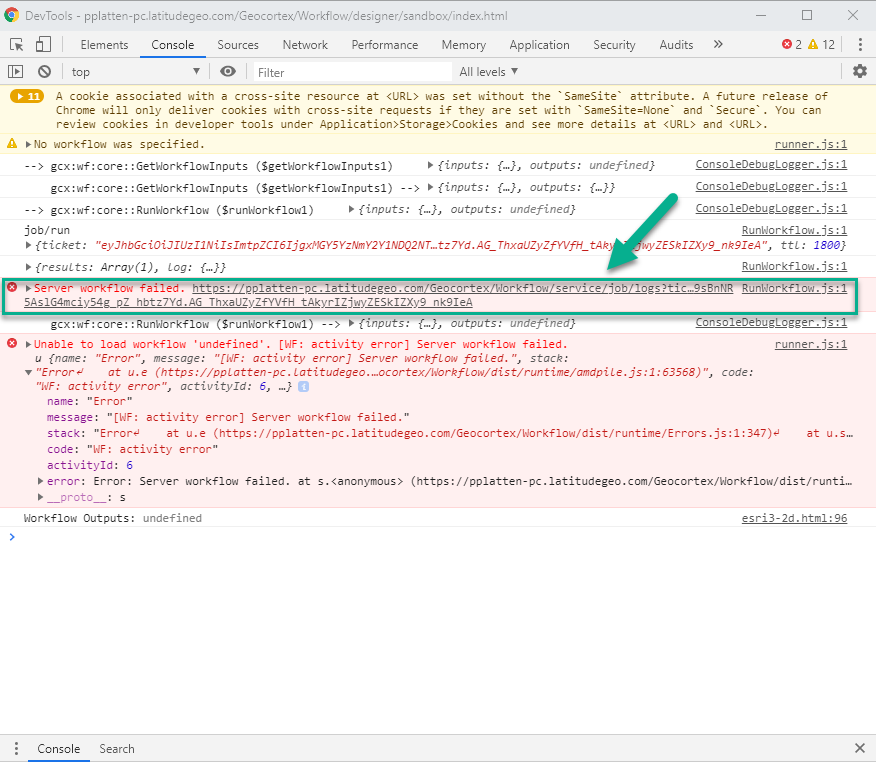
I do recommend our Support team if you need further assistance, but hopefully those logs will give you more information.
0 -
Hi @Peter Platten?
Yes, I worked with Latitude Support team pretty extensively on this issue and, while they were able to get it to work on your servers, they were unable to help us get it to work on ours. We did exactly the process you're describing above, as well as several other tests, and none were able to help resolve the issue. They ultimately logged it as a bug (34537) and we're still unable to use this activity.
Thanks!
0 -
Hi @Jessica Dell?, did you ever figure out the issue? I'm banging my head against a wall trying to figure out the send email activity. I've got the email settings wired up on the back end correctly and I know the server can talk to my SMTP server with the provided json information (I run powershell scripts that send emails and have essentials with send email on the same box with the same settings). No matter what I do or how I try to configure it I get an auth error from WF5 (even though my SMTP server allows anonymous sending)
0 -
Hi @Shawn Roberts?. Unfortunately no, we were never able to get it to work, and have not yet heard back from Latitude on the bug they logged for it. Yes similarly we ran powershell scripts to ensure that the server could talk to the SMTP server and successfully send emails, which all worked fine, but the Send Email activity never worked, no matter what configurations we tried (even with the help of the Latitude support team).
0 -

same over here, send email with telnet from workflow server works fine
but not with WF5 email activity
done exaclty whats in the help:
'Mail Server Connections for Server Workflows'
0 -
After almost two days of trial and error I was able to get mine up and running correctly. @k l? I found the server logs valuable for the stack trace to see what the error was. In my case it was the point made on docs.geocortex if you disable SSL in the json but the server is set to accept SSL it will fail.
In my case our STMP server was set to accept SSL & non SSL. But because I was trying to hit the server through its internal IP aka no cert (no subroute configured off one of our certificates), it was failing as the STMP server could technically accept SSL.
It manifested its head in the server logs as a client unable to auth error, which I found odd as the server was set to accept anonomyous relay (port 25). But after following the stack traces I eventually got to the route of the problem which was failed connection attempts and just set up a subroute with a valid cert on it.
Just posting in hopes it may help someone else experiencing a similar issue.
0 -

Shawn, thanks for your post. Using the fully qualified domain name instead of the IP address fixed our issue too. Even though EnableSSL was set to 'false', because the email server was accepting both SSL and non-SSL email requests, it was necessary to use the FQDN, because that is what the SSL certificate was registered to.
It's a bit like using https://xx.xx.xx.xx using the IP address. This will give a certificate error even if the web server has an SSL certificate. You'd need to use the FQDN or DNS alias, depending on which the SSL cert if registered with.
0
Bitte melden Sie sich an, um einen Kommentar zu hinterlassen.
Kommentare
9 Kommentare