Query Layer to Set Map Extent

I am Querying Layer tool (ID: query1), set Return Geometry to True, and put the Set Map Extent tool (ID: setMapExtent1) to the Geometry Input as =$query1.feature.geometry shouldn't this work to zoom to the first feature that is returned back?
-

What I usually do before the Set Map Extent activity is a Get Feature Geometry ( Get Feature Set Geometries) activity and use its output in the Set Map extent activity
0 -
I have tried both tools, and alas neither works. for the when I am seeing the Network Developer tool in chrome I see the SetViewExtent.js is have a Status Code of 304, so I am thinking it has something to do with projections.
0 -

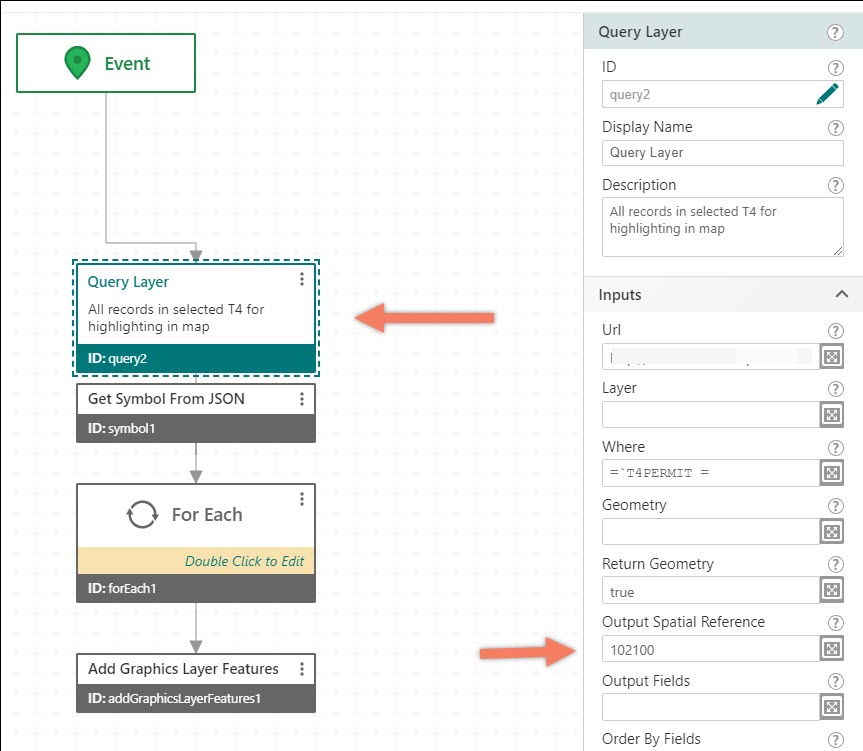
I was having the same problem and for me it turned out I didn't set the return coordinate system to match that of the basemap. Once I did it, it worked. ?
0 -
Hi Linda, I saw that on some older posts that had that. How did you go about the change?
0 -
specify in your query layer activity
 0
0
Bitte melden Sie sich an, um einen Kommentar zu hinterlassen.
Kommentare
5 Kommentare