Help with relaying layer list info in WAB to Workflow5 activities

We are having a heck of time getting the GW5 samples to work with our layer list in our portal's WAB. For example, the 'Get and Set Layer Property' workflow (https://latitudegeo.maps.arcgis.com/home/item.html?id=37b4742fade94bd789c8ed214d3834a4). I get null values for the input and output opacity values. A variety of other issues exist too, trying to read the layer list content. Other workflows work fine if we are using on prem services we are accessing via urls for REST calls... but to dynamically get info is a challenge. Can anyone point us in the right direction please?
-
to clarify something... We are getting null values for the old and new value outputs in the Set Layer Property outputs... not 'input and output opacity values'
0 -

Hi Ryan,
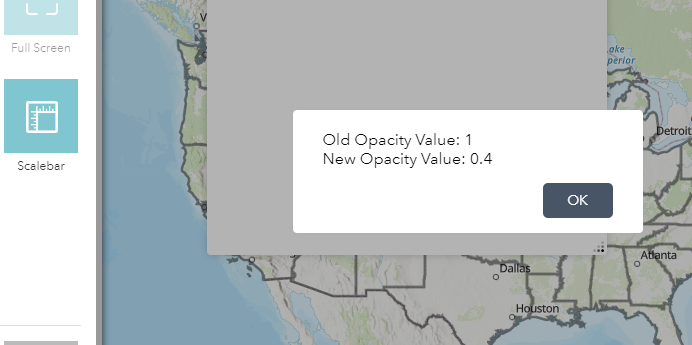
The outputs are null values, I think the layer Id in workflow you may need to update. In WAB the map load web map, which is different from GVH. For example, if you change example workflow layer id to "Census_1278", it returns value.
Cheers
Long
 0
0 -
Thanks for the info Long. How would I know that layer has that id though? I am trying to ultimately return all of the layers in the layer list into a picklist. These layers could be added on the fly by the end user as well.
0 -
Just an update. I can get the layer id with the 'Get Layer' activity, but I have to hard code the layer name. So, I still need to read the layer list dynamically. Anyone have any samples of this?
0 -
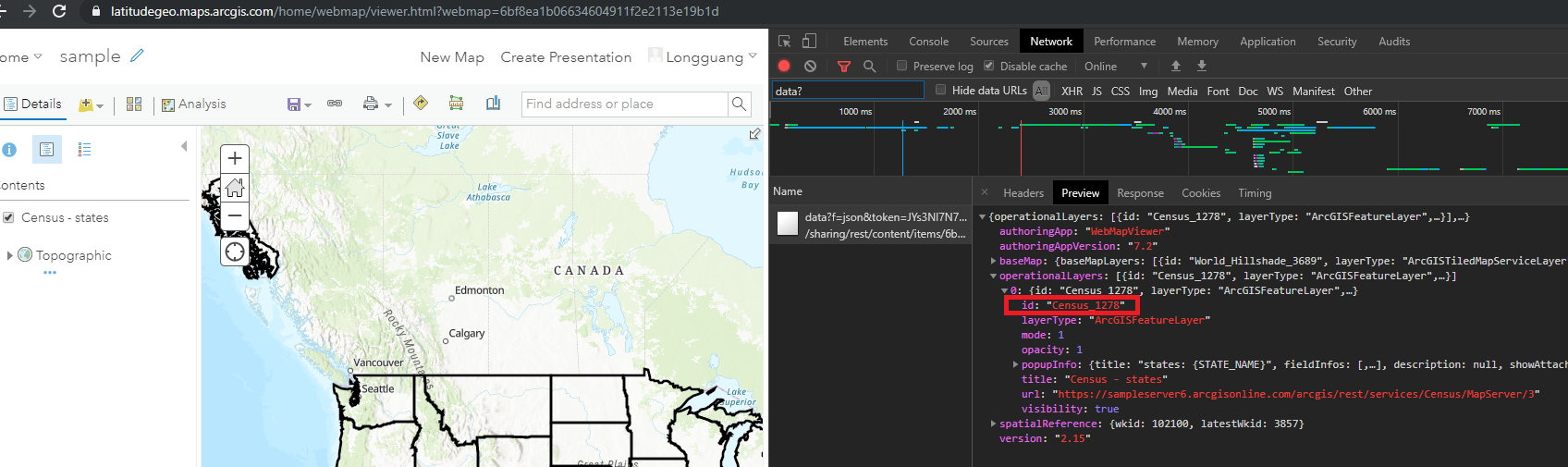
You can find layer id from dev tool network when you load web map.
steps:
- load the web map
- press F12 and open dev tool network
- input "data?" into filter
- load the web map
- click the "data?f=json"
- open the preview tab for the request
- expand "operationalLayers"
you will find all layers and their ids etc info for the web map.
Cheers
Long
 0
0 -
Thanks for the reply Long. I think we'll look for a more systematic approach than querying the web traffic though.
0 -

Hi Ryan,
It may be best to use the "Get Layer" activity and provide the layer name as it is defined in the web map. From the outputs of this activity, you can get the full layer object to use in queries rather than the layer ID.
Matt Hodgson
Software Developer
Latitude Geographics Group Ltd.
0 -
We figured it out. The goal again was to completely make this dynamic, so we don't know the layer names going in. We populated the dropdown list with a subworkflow: Get Map > Create Value (empty array) > For Each (Add Item by title) > Get Form Elements > Set Form Elements. User picks value > Get Layer > Get Layer Property > Query > Calc Acres. Sort of a major pain compared to the Essentials workflow.... due to lack of documentation and good examples.
0 -

As someone new to Geocortext workflows, but with a programming background in Visual Studio, I've found the lack of simple examples very frustrating (lack of Intellisense too). Just trying to iterate through a collection with a For Loop, and plug in a Numeric argument to an Array[k] call -- was a nightmare.
=$forEach.pass in theory should have worked here (as a number iterator) Array[$forEach.pass].someProperty -- but there were all sort of string vs integer problems here (and .toString() and .toPrecision() calls rarely did what I expected them to), even though they were "available" to the collection.
The API model looks very rich by inspecting it with Log Activity. for example this call provided what we needed to populate a DropDrop with all the Layer List Names in the current Web App (ie a dynamic list -- not "hard coded") :
=$map2.map.map.itemInfo.itemData.operationalLayers[1].title
But I could never figure out how to dynamically walk through that collection of layers, to a Get the Layers Listing to plug into Get Collection Item ==> DropDown,
Even with much trial and error:
var1 = $forEach1.pass;
=$map1.map.map.itemInfo.itemData.operationalLayers[var1].title
or these substitution calls:
=$map1.map.map.itemInfo.itemData.operationalLayers[$forEach1.pass].title
=$map21map.map.itemInfo.itemData.operationalLayers[$forEach1.pass.toPrecision(1)].title
=$forEach1.pass += $map1.map.map.itemInfo.itemData.operationalLayers[$forEach1.pass.toPrecision(1)].title
We eventually found a short-cut solution: that involved using Create Value as an "Array Variable" by using this {undocumented} trick, set its value to =[]
Then the forEach could be used to populate that Value "list" by:
Setting the forEach collection to:
$map1.map.map.itemInfo.itemData.operationalLayers
and within the loop, using
AddItem to populate the Create Value (variable), preceding the ForEach;
This trick allowed the by-passing of the explicit references Array[0], Array[1], Array[2], etc, by this implicit (BUT UNDOCUMENTED) substitution call within the ForEach, within the Create Value:
=$forEach1.item.title
and
=$forEach1.item.id
etc.
With this construct suddenly all the properties of the Collection become available.
With the Layer List created in the Value activity it was a relatively simple matter to plug that "names list" into the DropDown. -- This really instead, should be a simple function call, like: =$map1.GetLayersListing() or something like that.
Where is the "For Dummies" manual for Geocortex on WAB ?
If you want programmers to adopt this toolset -- there really needs to be better documentation, better Help, and more real world Workflow examples. Both of the simple and complex variety.
Building this Dynamic List task took me several days, when at most it should have been 1 day tops. Which is entirely unacceptable in real world development.
my 2 cents, and as resourceful, creative programmer.
0
Bitte melden Sie sich an, um einen Kommentar zu hinterlassen.
Kommentare
9 Kommentare