Windows 2012 upgrade causing certificate trouble

Since upgrading to Windows Server 2012 from 2008 yesterday, users are being prompted for a certificate when connecting to Geocortex. Here's what it looks like on my machine
_img_ alt="Certificate prompt showing Subject, Issuer, and Serial for auththenticating to maps.brucecounty.on.ca:443" src="https://maps.brucecounty.on.ca/images/certificate_prompt.png" _/_img_
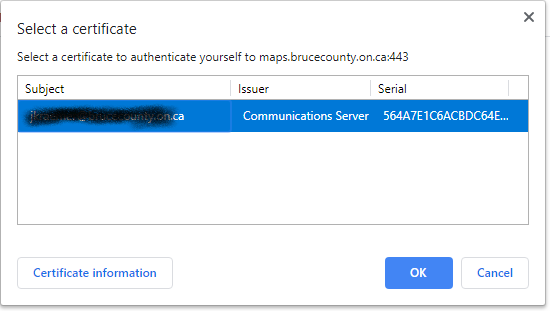
I had inserted the two 32-bit DWORD registry keys SchUseStrongCrypto as instructed on this site because they did not survive the OS update. But even after doing so and rebooting, it didn't resolve this.
What else must I look for?
Thanks,
Justin
0
-
By clicking Cancel the site will load, but that's counterintuitive, and I'm getting lots of phone calls 0 -
Thanks to my contacting Esri Canada technical support, with the help of Chris Carr-White there we got the problem solved. I post it here in case it be useful to someone else.
Here's what we did:
In IIS Manager, on the left hand side, click on Default Web site.
In the Default Web Site Home panel, double-click SSL Settings.
Leave Require SSL unchecked if it is unchecked already.
Under Client certificates, click Ignore. Then in the right-hand panel, click Apply.
By the way, I had already removed Geocortex.Platform from IIS Modules because before doing so, the default page would fail to load.0 -

Hi Justin,
We are about to upgrade from 2008 to 2012...our second attempt. First one failed and we rolled back.
Did you remove Geocortex.Platform from IIS modules before or after the upgrade? Any other advice to share or steps we should take prior to the upgrade?
Thank you!0 -
Hi Stephanie,
I removed Geocortex.Platform from IIS modules only after the Windows upgrade.0
Bitte melden Sie sich an, um einen Kommentar zu hinterlassen.
Kommentare
4 Kommentare