Web Viewer with Workflows visibility issues.

I've got a simple layout that I'm adding a workflow that displays a form into it.
To do this I have a button that calls the workflow and the workflow goes into the "workflow slot" on the map. I'm experiencing two issues with this.
there is no slot for "center of the map". Can you force the workflow to display in the center of the map screen? Because it's a form based workflow I want people attention to be drawn directly to it, but the only options are to have it tucked into a corner or open up a new panel.
My second issue is with visibility. When the workflow component opens it has no background color, which makes the form effectively unreadable. I've attached an image of this. Is there a good way to clean this up? I'm sure its a setting I'm missing somewhere. I realize I can make the form text a different color but not preferable.
-

Hi Shawn,
Unfortunately, we don't have the "center of the map" slot available, but we have a close of what you need option, which is "Top Center" slot.
The workflow component alone doesn't have its own background. To workaround this, you can wrap it within panel component, and slot the panel to "Top Center" . Please see pic below.

Cheers,
Pairin Mason
0 -
Hi Pairin thanks for help.
I had originally tried the panel as well but I found the panel was hiding form results behind it. I have included a screen shot as an example. The top result of the auto complete box is always being hidden behind the panel which causes other issues.
If I drop the panel then all the results display, likely because there is no background to hide it.
0 -
Hi Shawn,
I tried to reproduce the issue locally, but not able to see the issue in different browsers.
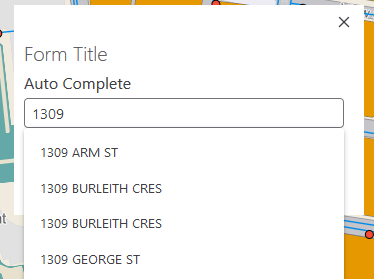
Is it possible for you to share the workflow/app, Geocortex Web version, browser/version that you're seeing the issue?
Please feel free to share them here pmason@latitudegeo.com
Cheers,
Pairin Mason
0 -
For anyone experiencing the same issue. The panel that the workflow must sit in was the issue. If its default visibility was set to "maximum" it was hiding the autocomplete values. By setting it to default it stopped hiding them.
0 -

Thanks for the follow-up info @Shawn Roberts? ... I always find it super helpful when we learn what the issue was and how to work around it.
0
Bitte melden Sie sich an, um einen Kommentar zu hinterlassen.
Kommentare
5 Kommentare