How to get ID of a form item for CSS

I've got a workflow with a couple forms each with images in them. I want to use the inject CSS tool to clean up how one or two of images look via css. However when I use the browser inspector tools to get the id of the element to apply css all it shows is a class. Problem is I don't want to apply css to all of the features of the class just a select one. I'm sure its something small and simple I'm missing of how to get the HTML id's to app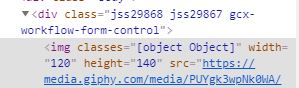 ly css.
-

Hi Shawn,
Each form element includes a class which is unique to that element. If you have an Image element on your form called image1, its CSS class will be "gcx-forms-image1".
0 -
They also include a class for the element type, in this case "Image". That way you have the best of both worlds. You could apply a style to all Image elements if desired, or target a specific one.
0 -
perfect thanks Ken, I knew it was something simple I was missing.
0 -
Hi @Ken Lyon? , just to follow up on this.
The path to the single image I'm trying to modify is Form2/image2 (id)
in the css I've set
.gcx-forms-image2
{
valid css..
}
but it does not pick up the css. If I drop the .gcx-forms and run the css for all image tags it works perfectly fine, but as soon as I refine it to one element it no longer works. I've tried all sorts of variations that I can think of but keep coming back to the same result. Any advice?
0 -
Looking at your original screenshot again, it seems there is a bug with the way the classes are being assigned to the `img` element:
<img classes="[object Object]"Which viewer are you using, and what version?
0 -
Hi Ken, I'm using Web 5.6.0 & Workflow 5.15.1
I've attached a sample test workflow I was using to confirm the issues I am experiencing are odd. I'm just using CSS to hide the image to test to see if its doing anything. If I run it out of sandbox it hides the forms image, and if I run it out of web it does not hide it.
I originally thought it was because I was using the image "height" & "width" fields on the form and injecting CSS but it doesn't appear to affect anything. I'm also running load events on the form and thought that may have something to do with it, but again to no avail
Thanks,
0 -
Hi Shawn,
I did the simplest test I could think of. I added a Display Form with an image to a blank workflow. Comparing the sandbox and Geocortex Web, I do see some differences in the way the CSS is applied to the elements. It does not seem possible to target a form element uniquely at this time in Geocortex Web. I have passed this information on to the appropriate team.
For now, maybe you could try something like:
.gcx-workflow-form-control img {

}
You might need to refine it a bit as it's possible there are other elements on the form that also include an img element. Perhaps you could use the :nth-child() pseudo-class to specify which form control you mean.
0 -

Hi Shawn,
Ken is correct -- unfortunately we do not currently have classes such as "gcx-forms-image1" on elements in Web, like the ones in the sandbox. However, we will be adding these in a future release to make this type of use case easier. In the meantime, Ken's suggestions above should work, but of course may need to be updated whenever form elements are added or removed.
0 -

Hi,
Also, I can't see that setting the styleName property of form elements has any effect in Geocortex Web. Will that be implemented? Without this, I think it's difficult to style one form element without affecting other elements of the same type
0 -
Hi everyone,
We have now added the "gcx-forms-<id>" class names to workflow form items in Geocortex Web 5.11.0. We will also be adding styleName support in an upcoming release. Thanks for you feedback.
0 -

Any chance of having the form id name showing up in the rendered form as the class name like the elements? Or the ability to change the form styleName with the set element property activity?
It is currently difficult to change form widths without affect all forms on a site. Something as simple as the following would do it.
class="gcx-forms defaults custom formIDFromWorkflowDesigner"
0
Bitte melden Sie sich an, um einen Kommentar zu hinterlassen.
Kommentare
11 Kommentare