How to save values to Local Storage in workflow5?

Hi all,
Is there a way for me to save values to Local Storage?
For example, in console: localStorage.setItem('key', 'value')
I tried to run the same code using Evaluate Expression activity, but it doesn't work.
-

Hi Zac,
Depending on your use case, you might be interested in using the Set and Get Application Data activities to temporarily store values between running of workflows.
Thanks, Stefan
0 -

Hi @Stefan Schweigert? , thank you for your reply.
The variables will be removed when users reload the page using Set Application Data activities. I want to save some values to the browser so that they can be re-used.
- Is there a way to evaluate JavaScript syntax :localStorage.setItem('key', 'value') in a workflow?
- Or can this be implemented in a custom activity?
Thanks
0 -
Hi Zac,
We don't currently expose the localStorage object so your only option at this time is to write a custom activity or create an Idea.
Thanks, Stefan
0 -
@Stefan Schweigert? ,thank you. Appreciate it.
0 -
Please expose localStorage ASAP - as WF5 is supposed to be Javascript at the core it's frustrating not to have access to these basic properties that would be so useful. The whole point of Workflows is to readily access these activities without having to resort to customized activity development.
0 -

Hi James,
Thanks for your feedback. When designing Workflow 5, the decision was made early on to only support a subset of Javascript functionality that we would whitelist on a case by case basis. This allowed us to effectively support the parts that we make available in a cross-platform way for all of our applications.
As you can imagine, we get lots of suggestions for improvements but we do have limited resources available to prioritize and address them. As Stefan suggested to Zac, contributing to our Ideas page will allow others to vote on your idea and help us to prioritize it as necessary.
0 -
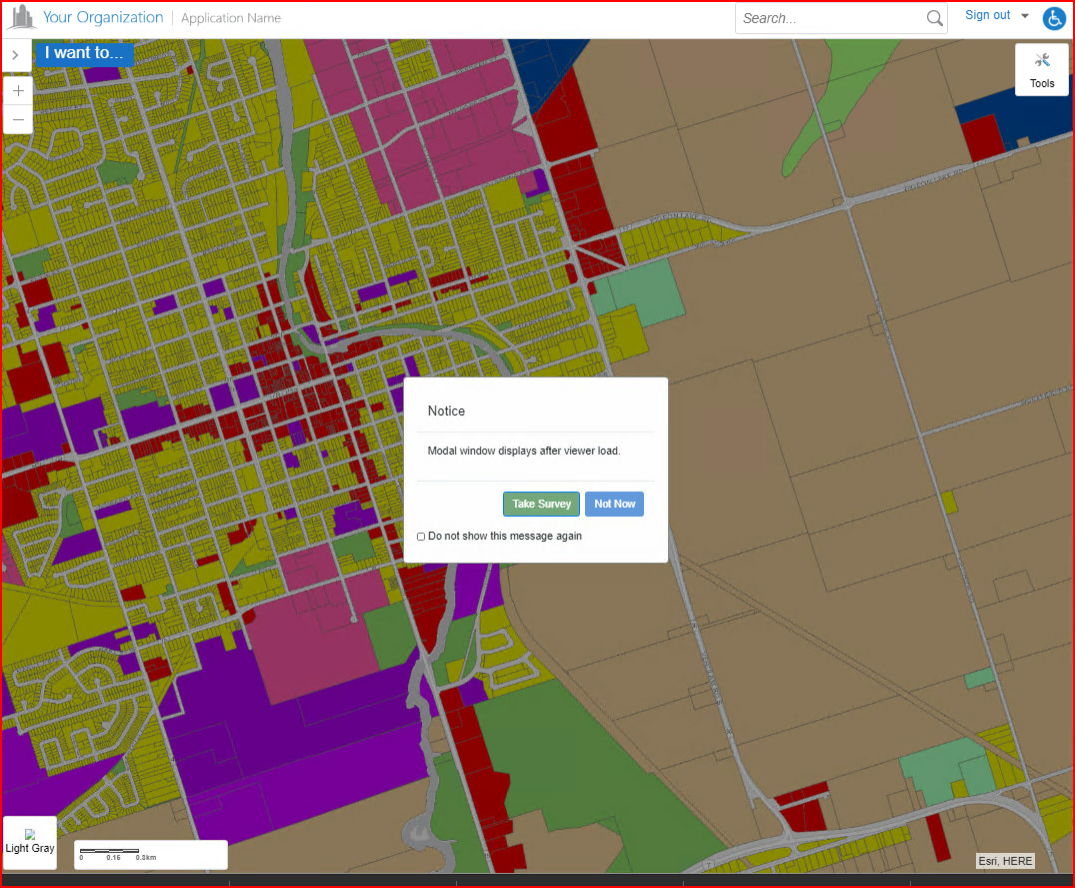
Until W5 exposes the localStorage property we leveraged the Bootstrap Modal to handle a modal window directly on the index page of the html5 viewer, accessing the localStorage for a 'Do Not Show Again' checkbox. It's a hack but comes out quite nice for our needs.
/*Show modal window on document ready if doNotShowAgain === 'False' in local storage*/
$(document).ready(function(){
var lS = localStorage.getItem("doNotShowAgain");
if (lS === "False") {
$("#myModal").modal('show');
}
});
 0
0 -
@James Auld? Thank you for your latest reply.
Can I ask where you wrote the scripts above? Did you put it in a custom activity?
0 -
We put the html modal script directly into the html5 viewer index.html page and wrote a custom js and css that are referenced from that page. It's proving extremely useful for us with multiple applications. Happy to share if you can provide an email address.
James
0 -
Thank you @James Auld? , my email is: zacwang15@gmail.com
Appreciate it.
0 -
I need to access variables set by Set Application Data activity from a custom HTML5 viewer module. @Stefan Schweigert? is the variables set by Set Application Data activity also in the localStorage object, which you mentioned is not exposable at the moment?
BTW, for anyone else here's the link to the idea https://communities.geocortex.com/s/ideas#0875x0000000CYdAAM
0 -
Hi Jack,
That activity stores values in a storage object, not localStorage. Please upvote the associated idea to indicate interest in this feature.
Thanks, Stefan
0
Bitte melden Sie sich an, um einen Kommentar zu hinterlassen.
Kommentare
12 Kommentare