Geocortex Web - Search settings

 How do I control the search setting. I don't understand how search work, and were my results are coming from?
In the attached image I am searching for a specific address '1819 Farnam St' and I am getting over 50 results. I cannot figure out why those specific features were returned in result list? If I look at the details of returned features none of them includes '1819 Farnam St'.
So how do I modify the search parameters to get better results?
Thank you,
Nataliya
-
@Nataliya Lys? , I am also investigating search functionality. In the web designer, clicking on the map will give you a list of layers in the right hand panel (layer extensions). You can control searchability of the layer (and fields within the layer) toggling the icon with the magnifying glass on/off. Have you tried that?
I have been able to target specific layers and fields that way.
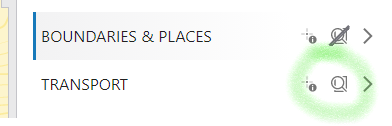 layers and fields0
 -
@Peter MacKenzie? thanks for your feedback. Yes, I tried the setting under 'layer extensions'. I only have one layer, and I only made one field searchable in that layers.
I also noticed that even if I try a different address I still seem to be getting the same 52 results (except that geocoder results are different). It seems like the search is looking for the data in current map extent only. And I cannot figure out how to force the search to use the extent of entire dataset?
 0
0 -

Hi Nataliya,
If you don't mind, which Geocortex Web version are you currently on?
In Geocortex Web 5.11, we made some tweaks to improve our search functionality to include results from outside of the current map extent. And you can also perform an exact phrase search by wrapping a phrase within quotation (eg. "1819 Farnam St") to get better matching results.
If no quotation wrapping, it will allow matching on partial terms such as '819', 'Farnam', and 'St', and then search attempts to rank them based on how well the overall match is.
Kind Regards,
Pairin
0 -

To expand on Pairin's comment. We also made a change so that when you click on a geocode suggestion, it automatically wraps that term in " " so that you get an exact match.
0 -
I am at 5.11.
Ok see, so if the text is in "double quotes" then it will search for the exact match. But if it's not it searches everything?! While its kind of makes sense, it doesn't seem to be user friendly for the end users. I cannot expect my users to know to put the text in double quotes to return exact results.
One of search fields that I have is email address field, and I want user to be able to find the data by searching by email address. So if I just enter an email address I am getting 50 results, that seem to be random to me. But if I put the email in the " ", then I get the expected results. Again, doesn't seem to be user friendly for the end users. Also, if I just enter a part of my email "nataliya.lys" (but leave out @douglascounty-ne.gov) then I am not getting any results at all.
1 -
I have a similar search question so tacking it on here, hope that's ok...
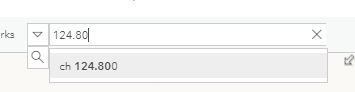
I have a search-enabled text field containing the text ch 124.800
A search on 124.800 returns 1 result. A search in 124.80 returns 0 results.
Any ideas why this isn't working?
Using GXW 5.12
0 -
to add to this...the search DOES behave as expected in the Portal map viewer
 0
0 -
Hi @Peter MacKenzie? ... yes absolutely OK to pile on here and ask questions. We'll dig in and see if we can answer this for you. It sounds like it may be worth a new post summarizing the current search behavior in a single place so folks can verify their experience against the stated thing.
0 -

@Cam Barnard? @Peter MacKenzie? We are experiencing the same issue with the search component, we are using GXW 5.12.1
0 -
@Peter MacKenzie? & @Elsalloul, Ahmed?
A quick update.
I'm closing in on this, I was able to reproduce the behavior you described Peter.
Ahmed, can you give me an example or two of what your search string is for and what the underlying record is set to? I've got a small data set setup for testing and development here and another example or two would be great.
0 -
Just adding to this post for future readers - if anyone is in the same scenario as Nataliya and would prefer that the end-user doesn't have to add double quotes to get an exact match, please add your vote and feedback to https://communities.geocortex.com/s/ideas#0875x0000005F16AAE
That will help us keep track of how many organizations are requesting this feature/improvement
0 -
@Cam Barnard? In one of the cases the searchable field is a string containing the full name of a worker. Searching for 'John Smith', 'John' or 'Smith' will return a correct result, but searching for 'Joh' or 'Smit' will return 0 results. Similar behaviour is experienced searching fields of integer type.
0 -

piling on here... the idea says it's now available, but i'm still getting too many search results. does something need to be toggled on so double quotes aren't necessary in Web?
0 -

I'm still having the issue as well. It seems like double quotes are automatically added to the geocoder address. But if I have any other fields, from any other layers configured to be searchable, I'm still getting a lot of results and they are not even close to the address that i seach?!
Here is an example: geocode return correct address, and property search isn't returning anything even close to the address I entered. I don't understand why it acts this way?
 0
0 -
I ended up making a workflow for search that just adds in the double quotes. I converted the default Search events to a workflow, then added in an "Evaluate Expression" before tasks.search with an expression of =$getWorkflowInputs.inputs.context.searchText='"'+$getWorkflowInputs.inputs.context.searchText+'"'
0 -

Chelsea - Thanks for the Evaluate Expression idea. I've converted the default search to a workflow and added additional tasks to handle search adding double quotes to geocoding tasks. This appears to work but hasn't been fully tested. Note you will need to edit the JSON and add your workflow license URL - Search for INSERT_YOUR_LICENSE_URL_HERE.
{"_properties":{"isServerWorkflow":false},"components":[{"id":2,"steps":[{"id":3,"inputs":{},"position":"0,-130","purpose":"start","title":"Start","transitions":[{"id":20,"inputs":{},"position":"90,-70 90,-20","target":{"id":11}}]},{"action":"gcx:wf:core::Container","id":11,"inputs":{},"position":"-30,-20","title":"Get Inputs","transitions":[{"id":33,"inputs":{},"position":"90,70 90,120","sourceConnector":"bottom","target":{"id":23},"targetConnector":"top"}]},{"action":"gcx:wf:core::Evaluate","id":23,"inputs":{"expression":{"accessors":["$getWorkflowInputs","$getWorkflowInputs"],"annotations":[{"count":18,"index":0,"kind":"idref"},{"count":18,"index":53,"kind":"idref"}],"code":"$getWorkflowInputs.inputs.context.searchText = '\"' + $getWorkflowInputs.inputs.context.searchText + '\"'","source":"$getWorkflowInputs.inputs.context.searchText = '\"' + $getWorkflowInputs.inputs.context.searchText + '\"'"}},"name":"evaluate1","position":"-30,120","title":"Evaluate Expression","transitions":[{"id":74,"inputs":{},"position":"90,190 90,240","sourceConnector":"bottom","target":{"id":45}}]},{"action":"gcx:wf:core::Annotation","description":"Add double quotes to the entered expression.","id":30,"inputs":{},"position":"-390,100","title":"Notes"},{"action":"gcx:wf:core::Annotation","description":"It appears that when geocoding is enabled the search adds double quotes to entries that used for geocoding.","id":31,"inputs":{},"position":"-390,-70","title":"Notes"},{"action":"gcx:wf:core::Annotation","description":"Copy the search text to ModSearch","id":32,"inputs":{},"position":"-390,220","title":"Notes"},{"action":"gcx:wf:core::Annotation","description":"Replace \"\"\"\" with \" in ModSearch","id":34,"inputs":{},"position":"-390,340","title":"Notes"},{"action":"gcx:wf:core::Annotation","description":"Replace the search expression with the modified version - textReplace1","id":36,"inputs":{},"position":"-390,440","title":"Notes"},{"action":"gcx:wf:core::Annotation","description":"The rest are standard search tasks converted to a workflow from the Search component.","id":37,"inputs":{},"position":"-390,590","title":"Notes"},{"action":"gcx:wf:core::CreateValue","id":45,"inputs":{"expression":{"accessors":["$getWorkflowInputs"],"annotations":[{"count":18,"index":0,"kind":"idref"}],"code":"$getWorkflowInputs.inputs.context.searchText","source":"$getWorkflowInputs.inputs.context.searchText"}},"name":"ModSearch","position":"-30,240","title":"Create Value","transitions":[{"id":71,"inputs":{},"position":"90,310 90,360","sourceConnector":"bottom","target":{"id":63},"targetConnector":"top"}]},{"action":"gcx:wf:core::TextReplace","id":63,"inputs":{"newValue":{"accessors":[],"code":"'\"'","source":"'\"'"},"oldValue":{"accessors":[],"code":"'\"\"'","source":"'\"\"'"},"text":{"accessors":["$ModSearch"],"annotations":[{"count":10,"index":0,"kind":"idref"}],"code":"$ModSearch.result","source":"$ModSearch.result"}},"name":"textReplace1","position":"-30,360","title":"Text Replace","transitions":[{"id":75,"inputs":{},"position":"90,430 90,480","sourceConnector":"bottom","target":{"id":69}}]},{"action":"gcx:wf:core::Evaluate","id":69,"inputs":{"expression":{"accessors":["$getWorkflowInputs","$textReplace1"],"annotations":[{"count":18,"index":0,"kind":"idref"},{"count":13,"index":47,"kind":"idref"}],"code":"$getWorkflowInputs.inputs.context.searchText = $textReplace1.result","source":"$getWorkflowInputs.inputs.context.searchText = $textReplace1.result"}},"name":"evaluate3","position":"-30,480","title":"Evaluate Expression","transitions":[{"id":73,"inputs":{},"position":"90,550 90,600","target":{"id":10000}}]},{"action":"gcx:wf:app::RunOperation","id":10000,"inputs":{"operationName":"tasks.search","operationParameter":{"accessors":["$getWorkflowInputs"],"annotations":[{"count":18,"index":0,"kind":"idref"}],"code":"$getWorkflowInputs.inputs.context","source":"$getWorkflowInputs.inputs.context"}},"name":"runOperation100","position":"-30,600","title":"tasks.search","transitions":[{"id":10003,"inputs":{},"position":"90,670 90,720","target":{"id":10002}}]},{"action":"gcx:wf:app::RunCommand","id":10002,"inputs":{"commandName":"results.display","commandParameter":{"accessors":["$runOperation100"],"annotations":[{"count":16,"index":0,"kind":"idref"}],"code":"$runOperation100.result","source":"$runOperation100.result"}},"name":"runCommand101","position":"-30,720","title":"results.display","transitions":[{"id":35,"inputs":{},"position":"90,790 90,840","sourceConnector":"bottom","target":{"id":10004}}]},{"action":"gcx:wf:app::RunCommand","id":10004,"inputs":{"commandName":"charts.display","commandParameter":{"accessors":["$runOperation100"],"annotations":[{"count":16,"index":0,"kind":"idref"}],"code":"$runOperation100.result","source":"$runOperation100.result"}},"name":"runCommand102","position":"-30,840","title":"charts.display","transitions":[{"id":10007,"inputs":{},"position":"90,910 90,960","target":{"id":10006}}]},{"action":"gcx:wf:app::RunCommand","id":10006,"inputs":{"commandName":"kpi.display","commandParameter":{"accessors":["$runOperation100"],"annotations":[{"count":16,"index":0,"kind":"idref"}],"code":"$runOperation100.result","source":"$runOperation100.result"}},"name":"runCommand103","position":"-30,960","title":"kpi.display"}]},{"id":12,"steps":[{"id":13,"inputs":{},"position":"0,0","purpose":"start","title":"Container","transitions":[{"id":22,"inputs":{},"position":"90,60 90,110","target":{"id":19}}]},{"action":"gcx:wf:core::GetWorkflowInputs","id":19,"inputs":{},"name":"getWorkflowInputs","position":"-30,110","title":"Get Workflow Inputs"}]}],"deploymentConfig":{"supportedApps":{"VSW":true},"worksOffline":false},"designerVersion":"5.38.1+5","licenseInfo":{"licenseUrl":"https://INSERT_YOUR_LICENSE_URL_HERE/workflow/service/auth/license"},"start":{"id":3},"transitions":[{"branch":"content","id":14,"inputs":{},"source":{"id":11},"target":{"id":13}}]}0
Bitte melden Sie sich an, um einen Kommentar zu hinterlassen.
Kommentare
16 Kommentare