Inactivity in UI freezes workflows, and map tips

Hi all,
We are seeing our UI/session no longer run workflows after a fair amount of inactivity. Errors are thrown in the F12 dev tool console, as if to say the workflow option is no longer available. See attached image.
This is with the new 4.12.2 GE/GVH combo also.
If we refresh the client, things go back to normal, so we somehow need to capture this change, and prompt for it. We previously had the SignInHelper popup after sessions were left overnight, but I cant seem to get this to show as consistently as previous with older versions of Essentials.
Is there a setting for the SignInHelper.html popup so we can perhaps prompt the user to login again and refresh the client?
Or remove this issue to start with?
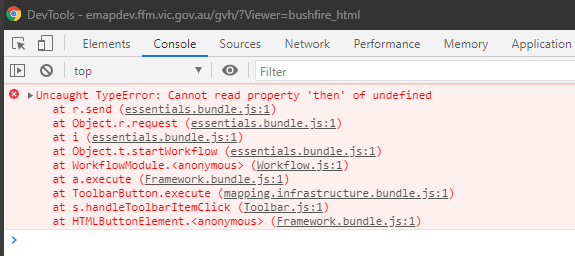 thanks
Gareth
-

We're also seeing this issue. On GVE/GVH 4.14.
Any tips on fixing it?
1 -

Is this issue fixed in GE/GVH 4.14.5?
Is there a workaround available for this in GE/GVH 4.14.4 please? Client prefers not to have to resort to refreshing the viewer to resolve this.
Thanks
0 -
I resolved this by changing the headers as instructed here:https://community.vertigis.com/hc/en-us/articles/4518854078354-Removing-nosniff-headers-in-Essentials-4-14-4
1 -
Thanks Dan. I did remove the nosniff header but unfortunately this did not fix the problem.
-1
Bitte melden Sie sich an, um einen Kommentar zu hinterlassen.
Kommentare
4 Kommentare