Geocortex Web 5.12.1 Showing Layers that Don't Exist in Source Map

Hello,
I am noticing since I upgraded to Web 5.12.1 the other day that the GCX Web Viewers are showing layers that I have removed from the source web map.
For instance, I have added a map service to the source map, but I then remove a handful of the layers that I don't need in my map. I save the map and return to the GCX Viewer designer, or the viewer itself, and those layers still exist.
For me, this is happening when the layers exist inside of a sub-layer grouping. For example, I add a map service of our wells; that map service has groupings of different well types; I remove one of the layers from inside one of those groupings, save the map, yet the GCX viewer is still showing that layer.
If I remove the parent group layer, that grouping and all of its associated sublayers are removed from the GCX viewer as expected. This appears to only be happening when removing single layers from inside of groupings.
Has anyone else seen this issue?
I have not dug into the JSON of the map viewer yet to try and decipher what's going on, but that will be my next step.
Thank you,
Brian
-

Hi Brian,
The issue you're currently experiencing is a known ticket on our end (45748). We'll do our best to resolve it in near future.
Kind Regards,
Pairin
0 -
@Pairin Mason?
Thanks for the update!
I am also seeing an oddity when printing that I imagine is related to this, but want to verify:
In the print output, layers that are turned off inside of those groups, are showing up in the map frame - but oddly, not in the legend.
It seems as though these two issues are related in some fashion.
Thanks,
Brian
0 -
@Pairin Mason?
Do you all have any additional information on this? This has created some significant issues in several of our maps where we have grouped layers.
We were hoping to deploy our viewers out to folks within the company within the next week, but this has adversely affected not only the display of layers in the maps, but also appears to be affecting printing, and multiple workflows where we have query tasks.
As such, this is preventing us from being able to proceed with our deployment plans.
Much appreciated,
Brian
0 -
Hi @Brian Cunningham? ,
Is it possible for you to give us an access for your app/webmap/printing/workflows to help us inspecting the issue more thoroughly, and hopefully we can find a workaround. If possible, you can share them to pairin.mason@vertigis.com
Cheers,
Pairin
0 -

I've been seeing a similar problem to the one initially raised by Brian and can see many 'redundant' references to feature services etc in my exported JSON file. It's good to know that there's already a ticket open for this.
I'm guessing that this could be causing a problem I'm having with the new Get Sharing Link option which gives InitializeError: Failed to initialize item: TypeError: Cannot set property 'visible' of undefined when I try to open the shared link? The error seems to appear at the point when the web map is being accessed.
0 -
Good morning @Pairin Mason? ,
Would you like me to simply provide the json files for each of those items?
Thanks,
Brian
0 -
Hi Brian and Peter,
@Brian Cunningham?
json files would be a good start, but if you can also provide a direct access to your items and layers with exact steps to reproduce the issues that would be fantastic. It also help us confirming the fix will work for your very case.
I'm currently unable to see the printing issue you described above on my end
("layers that are turned off inside of those groups, are showing up in the map frame - but oddly, not in the legend"). The reproducible materials would be very helpful.
@Peter Jackson?
We have a known bug ticket with the same error you're experiencing. The cause of the known bug is coming from some layers in our webmap fail to initialize. We hope to have it fixed by 5.13
However, the error is pretty generic. It could be from different reasons for your case. If we can inspect your app, that could be more certain.
Cheers,
Pairin Mason
0 -
Thanks @Pairin Mason? ,
Our data is all on an internal Portal that does not have outside access. The easiest solution would be a screen sharing session, is possible?
I am going to try a fresh start from scratch with a new viewer tomorrow and see if that resolves any issues that I'm seeing with printing and my workflows. If having a clean slate solves some of those issues, then we can proceed with your ideas for a work-around.
Appreciate it,
Brian
0 -
Hi @Pairin Mason? ,
I rebuilt my viewer this morning and things seem to be working a little smoother.
Other than the known issue with layers that have been removed from the map showing up in the viewer, I am only experiencing the printing issue now where I have layers inside of a grouping that are turned off, and not visible in the map viewer, but are showing up on the print output. My other issues with one of my workflows have been resolved. I found a place where I had a layerid hardcoded into the workflow; once I fixed that, those issues no longer occurred.
Can you provide information on the workaround(s) that you all have for fixing the known issue with the layers?
Much appreciated,
Brian
0 -
Hi @Brian Cunningham? ,
Unfortunately, after our dev took a close look to the issue where "grouping sub-layers removed from webmap are showing up in the viewer", there is no workaround can be done in 5.12.1. The fix will be coming in soon-to-release 5.13 version.
For the printing issue, sub-layers inside of grouping, did you turn off the layers visibility in webmap or via Web viewer?
Pairin
0 -
Good morning @Pairin Mason? ,
Your question on whether the layers were turned off in the webmap or via the web viewer had me double check, and I had the layers configured in the webmap as seen in the image below, which is when they show up on the print output:
So you can see that the parent map service is turned on, the grouping for the layers are turned off, but the layers are turned on so that they'll show up when the users turn on the group. The layers do not show up on the map in the viewer, but they do then show up on the print output.
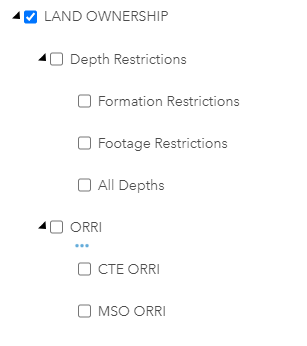
I then tested the configuration seen below in the webmap:
Here I turned off the layers inside of the grouping, and then they did not show up on the print output. This is a simple enough workaround for now.
Clear as mud? haha.
0 -
Bah, my images did not show up. Let me try and post them here:
Image 1:
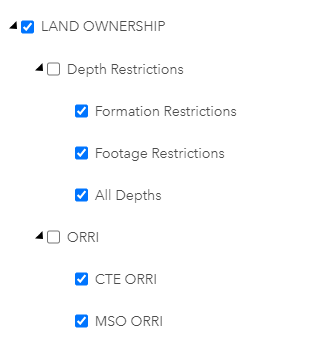
Image 2:
 0
0 -
Thank you very much @Brian Cunningham? for double checking that and sharing the screenshots!
It's very clear, and I now can reproduce the same printing issue on my end. I filed a new ticket (46202) for the team.
Kind Regards,
Pairin
0 -

We are having this issue now with a sublayerextension for an annotation layer in our basemap. Originally the annotation layer had two annotation classes, but we updated our Anno and now it only has 1 annotation class. The JSON for the webmap in AGOL doesn't show the old annotation class sublayer anywhere, but the vertigis app gives us an error when we open it saying that the layer can't be initialized.
We were able to fix the issue by removing the relevant parts from the JSON for the app, but since this is the basemap, it may be used in a number of applications that weren't created by our admin team and we are worried that this error will pop-up in the future when a layer is removed from the basemap for other users who won't know how to fix it within our organization.
This error persisted even when I selected a different web map with the same basemap in it, (although the error changed to a different layer), and then when I changed the webmap back to the original one the error came back too. There should be an option to refresh content JSON to whatever the current webmap shows in the vertigis studio.
0
Bitte melden Sie sich an, um einen Kommentar zu hinterlassen.
Kommentare
14 Kommentare