How to use a "Result List" and a "Result table" components in a single viewer ?

Hi,
I would like to display results in my viewer in two different ways:
1) First, the user selects a geographical feature. In the case of geographical features overlapping on the map, I use a "Result list" component so that the user can choose the feature he wants to display.
2) In a second step, the user has the possibility via a button (present in the "Result List" component) to display additional information related to the geographical feature but present in a table. I would like to be able to display this second information in a tabular form via a "Results Table" component.
The problem is that when the two components are used simultaneously together, they interfere with each other. Is there a way to make them co-exist or is there another way to do it?
Thanks for any help!
-

Hi Benjamin - the 'default' behavior in Web is to link the results list and results table together (by default they share a model behind the scenes) so that we could provide a similar experience to GVH where you could toggle between list and table.
You can sever that link so that they behave independently of each other.
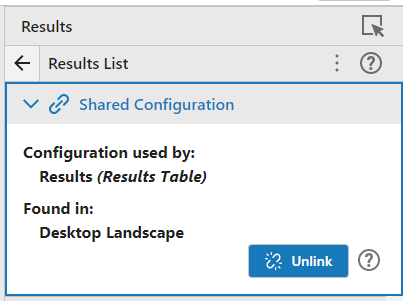 From your use case description. Do you intend to view only one feature at a time in the results table view?0
 -
Hello Cam,
Thank you for the information, it will certainly be useful to me !
In the meantime, I had proceeded in another way. Via an event click on the map component which allows to trigger a workflow containing a "Display Form" activity with an "Item Picker". The previous element is populated by the name of the geographical feature, thus makes it possible to replace a "Result List" component.
0 -

Cam Barnard Hi, I don't see this option available to unlink the two components.
Is there a new way for not showing features that are in the result list, in the result table? And keep these two lists separate depending on the different features that are requested?0
Bitte melden Sie sich an, um einen Kommentar zu hinterlassen.
Kommentare
3 Kommentare