Is it possible to reorder layers between different map services in Geocortex Web?

For example, my underlying web map has mapservice1 containing layers layer1a and layer1b, and a second, mapservice2 containing layers layer2a and layer2b. Do I have the freedom to reorder these in Geocortex Web, so that in the layer list they are in any order I choose, eg.: layer2b, layer1a, layer2a, layer1b?
-

Hi Mark,
Unfortunately, we don't have a support for the layer ordering inside GXW designer. You can reorder the layers inside the webmap itself using AGOL viewer.
Just a note, we have a recent known issue that the sublayers order doesn't get reflect properly in GXW. It's expected to be resolved soon. I'll add you as a stakeholder.
Kind Regards,
Pairin
0 -

Please add me as a stakeholder for this sublayer issue too @Pairin Mason? . Sounds like one to be aware of. Thanks.
0 -

@Mark Norbury? ... might be worth reading this post. I go over most of the common layer list related requests and how to accomplish them (and where). https://communities.geocortex.com/s/question/0D55x00007UIRGCCA5/a-cookbook-for-how-to-configure-your-gxw-layer-list-for-those-familiar-with-the-existing-capabilities-of-gegvh
0 -

1) is there an updated link for this since the current one is broken?
2) any updates on this functionality in the last couple of years?
0 -
Perfect, thank you so much, was able to find how to do it from your instructions!
0 -
So I found how to include/exclude layers and play with their properties, but back to the post's original question, is it possible to change the order of the layers in the layer list without affecting their drawing order? Looking to replicate the functionality in Geocortex Essentials where the Map Services tab controlled the drawing order and the Layer List tab controlled the order the layers showed up in the list. Couple of examples would be
- to be able to list the layers in alphabetical order and not have to worry about if they're points, lines, or polygons
- To have group layers that can sandwich around other layers, such as a group layer that has points and lines, and you want to have the points draw on top of, say, parcel boundaries but the lines to draw underneath them.
In GE these were super easy because I could group the layers in folders in the layer list however I wanted and control the drawing order independent from that.
1 -

Hi John Nerge & colleagues
There are distinct design differences between VertiGIS Studio Web (VSW) and Geocortex Essentials (GE). In VSW, both the layer draw order and their listing order are directly linked to the web map from Esri’s provided APIs. This means we need to follow the specific layers and their order as they are presented in the web map in VSW. Deviating from this with custom implementations could potentially lead to bugs, especially if the underlying implementation undergoes changes.
The web map serves as the primary source for map data in VSW, so it is crucial to focus on configuring our data there. While the Map Editor in Portal/ ArcGIS Online (AGOL) can be used for edits, it has limited capabilities. On the other hand, ArcGIS Pro offers a more comprehensive toolset. For instance, ArcGIS Pro allows you to set the Feature drawing order. Though this configuration may not provide the complete independence you're seeking, it can help address the immediate issue of parcel boundaries drawing beneath or above your other feature points and lines.
However, it's essential to note that achieving the same level of flexibility as in GE, like arranging layers in an arbitrary order independent of their drawing order, is currently not supported in VSW due to its adherence to Esri's definition of the web map for both layer listing and drawing order. We appreciate your feedback and understand the need for this flexibility. We recommend raising this as a feature request with Esri since any changes to this functionality need to be incorporated at the web map level.
1 -

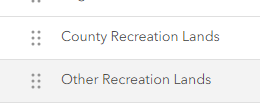
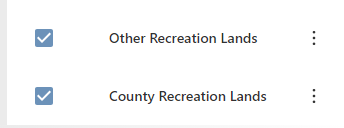
Hi Pairin and @... , do you know if the bug mentioned earlier is fixed? I'm still seeing that some sublayers do not honor their order in the AGO webmap:
AGO webmap:
5.28.0 Web Designer (on-prem):
 0
0 -
Hi Chelsea Rozek I dug into this and confirmed the issue Pairin mentioned was bug 150999 and it was resolved in our 5.15 release.
It could be that we have a cached copy of your webmap prior to the change. I would confirm that you hit the Refresh button in the Map component after your change of data.
I should also mention, our QA team has a recurring test item to confirm that Web respects the layer order from an ArcGIS web map. If we are not, that would be considered unexpected (buggy!) behaviour.
0 -
Thanks @... ! Hitting that refresh button fixed it for me!
1 -
You’re welcome Chelsea, glad to hear you got that worked out.
0
Bitte melden Sie sich an, um einen Kommentar zu hinterlassen.
Kommentare
12 Kommentare