Using Reverse Geocode in a workflow (Workflow 4)

I'm trying to use the Reverse Geocode activity to have a user right-click on the map, run the reverse geocode, and then load the address components into a Display Form. I've got the Reverse Geocode running fine, but the output is a ESRI.ArcGIS.Client.Tasks.Address. Any idea how I can extract the address from that data type to use as a string?
-

Use the Attributes property, this returns a dictionary with name/value pairs.
The following will return a comma separated list of address attribute names or values.
string.Join(",",address.Attributes.Keys)
string.Join(",",address.Attributes.Values)
This will return the value of the City attribute.
address.Attributes("City").ToStringI guess the attribute names are dependent on the used geocode service.
0 -
So I plugged string.Join(",",address.Attributes.Keys) into an alert, and it runs, but it doesn't return any values (blank). Do I need to specify the Keys somewhere in GE?
0 -
No, I guess there is something wrong with the (configuration of) the geocode service or Reverse Geocode activity, or it cannot find an address. Does the Location property return a value?
address.Location.ToString0 -
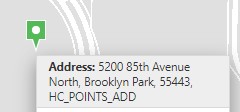
Nope, just returns the ol' "Object reference not set to an instance of an object" error. It does return an address in the context menu though.
 0
0 -
I get the same error using the ArcGIS World Geocoder too.
0 -
Sigh, okay, it was user error. I was reading too fast and thought the the Geocode Service URL parameter in the ReverseGeocode activity said Geometry Service URL. When I use an actual, ya know, geocode service, it works!
Thanks for all the help, Nico. I don't know if we've ever put it up to a vote, but if so you have mine for king of the forums.
1
Bitte melden Sie sich an, um einen Kommentar zu hinterlassen.
Kommentare
6 Kommentare