Query Layer

This is doing my head in
I can query a rest service with the following query
LMU_NAME = 'Bicentennial Park'
I cannot do a layer query in Workflow 5
I have tried
LMU_NAME = 'Bicentennial Park'
=LMU_NAME = 'Bicentennial Park'
=`LMU_NAME = 'Bicentennial Park'`
="LMU_NAME = 'Bicentennial Park'"
Nothing works
What is the correct syntax?
-

Jeff,
It should be: STATE_NAME = 'Hawaii'
if you use https://sampleserver6.arcgisonline.com/arcgis/rest/services/Census/MapServer/2 in Url.
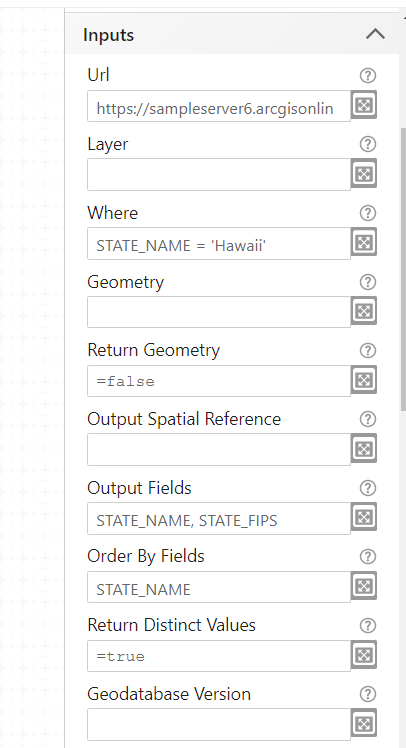
Erik
0 -
Just adding to Erik's response - I'd suggest checking the browser developer tools when running the workflow. There could be something like a CORS error in the console tab. If there isn't an error there, you could also switch to the network tab and run the workflow. It may log the query request that was sent to the layer, and you could check if looks like anything's wrong there
0 -
Thanks
I appear to have solved the problem - A spelling mistake in the one of the outputs
I'm slowly getting there.
Just trying to redo all the old workflows in Worflow5
Its a mammoth task and I have just scratched the surface
0
Bitte melden Sie sich an, um einen Kommentar zu hinterlassen.
Kommentare
3 Kommentare