Best Practice Tips - Mixed Security Web Map in Geocortex Web

Hello there,
I would like to be able to include a secured (to a portal group) feature service and an widely shared (with org) map service to web map that's included in a VertiGIS Studio Web App. Then, have security show the members of the secured group the secured feature layer (and hide the map service layers) and have the secured feature layer hidden from non security group members I was able to accomplish this in Geocortex Essentials with ALLOW/DENY and was wondering if this was possible in VertiGIS Studio Web (yet)
Currently when I try to add secured feature layers to a web map that's not secured I get a message to update security.
Any suggestions would be appreciated!
-Jake Brown
City of Portland
-
I also have questions about how to mimic the security features of Essentials. Did you find any documentation or answers?
0 -

Hi Jake, are you able to show the error message that you get? Is that when you are in portal (attempting to save the web map) or within the web designer?
Also, are you using token-secured services, or hosted feature layers in ArcGIS Enterprise/Online? Depending on requirements, you could use VertiGIS Studio Access Control, but I also think this should be possible with OOB web map security.If using token security then there are some options to embed credentials with an item and then use ArcGIS Enterprise sharing methods to override the security of the service. https://developers.arcgis.com/documentation/mapping-apis-and-services/security/#application-credentials
More information in regards to your potential use case would be useful.
Thanks,
-- Patrick0 -

I have this same question.
In map viewer when I save a publicly shared map, it prompts me to update the sharing setting for the layer shared to a group:
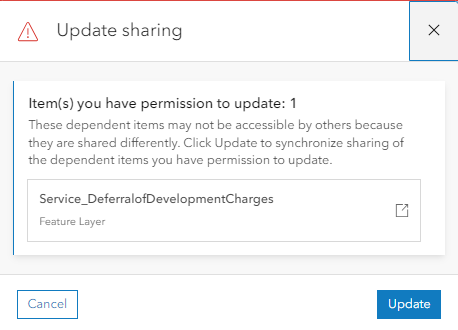
I can cancel and the map still saves. However in VSW when the map loads, it prompts for a sign in. When I cancel the login attempt, it fails to load the layer:
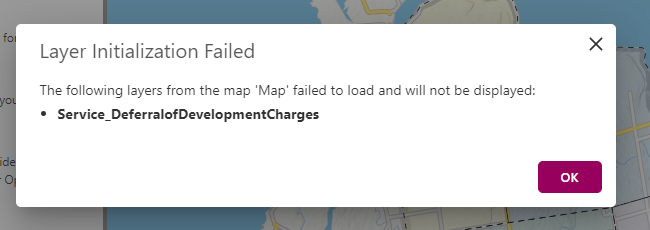
I know I can suppress the error message with the layer failure behavior setting, however there is still a sign-in prompt that I would like to suppress as well.
Can you describe in detail the prefered solution to work-around this problem? Ideally, I'd like to have a single, public VSW app, with some layers viewable to internal staff only. The visibility filters for other components work great in Designer, but I'd like the ability to apply them to layers as well.
Related:
1
Bitte melden Sie sich an, um einen Kommentar zu hinterlassen.
Kommentare
3 Kommentare