results.convert-to-xlsx Operation runs into error

Hi all,
I am having an issue with the Run Operation activity.
I am using the results.convert-to-xlsx operation in Workflow 5. (docs here)
I have queried a mapserver from which I have collected point features that I want to export to an .xlsx file.
The parameters I used were:
={ title: "title.xlsx", features: $query2.results }
But each thime the operation is run, I get an error:
"TypeError: Cannot read properties of undefined (reading 'title')"
However, when I only provide ={ title: "title.xlsx" } as an input, I receive this error:
"ArgumentError: Parameter 'features' cannot be empty."
I was hoping any of you could provide me some feedback on my parameters and hopefully resolve this issue I'm having.
Thanks in advance,
Cheers, Daan

-

I think the missing step here is a results.from-graphics operation to convert the query results to the right type to use in the results.convert-to-xlsx operation. I've got an example you can open in workflow designer via File > Open by URL here: https://www.arcgis.com/home/item.html?id=2440a6cbee204414be760b9f465fa1f9
2 -
Hi Amanda,
This works! Thank you so much.
The missing step was indeed the results.form-graphics opertation. The documentation however does not mention this let alone hint at it. Do you know of a way to make the documentation on this subject more accessible for future users?
Cheers, Daan.
0 -
Glad to hear that worked!
The tricky thing about improving the documentation is that it's used as a general API reference and it needs to serve folks who are using those commands & operations directly in Web designer, in workflows, and in custom Web development. Examples that are tailored to workflows probably can't be added there.
One improvement I can imagine being a bit cleaner is having a workflow activity whose input is a graphic or esri featureset, and whose action is to provide a download to the user. It would be combining the actions of results.from-graphics, results.convert-to-xlsx, and system.download-file so the workflow author doesn't need to go to all the way to the Web documentation and figure out the process with commands & operations. That probably couldn't be supported in WAB and Go, but Web and GVH both have the plumbing to do exports. You could post a suggestion for that on https://community.vertigis.com/hc/en-us/community/topics/4490539207442-Ideas-VertiGIS-Studio-Workflow
In case it's helpful for any similar processes in future workflows, here's my thought process for figuring out results.from-graphics was needed:
-our starting point is Query Layer activity. Checking the tooltips in workflow designer, its output types are Esri.Graphic, Esri.Graphic[], and Esri.FeatureSet

-our ending point is (at least for now) is results.convert-to-xlsx which takes any of these as its inputs:

"FeatureSet" is in there. But looking closer, the type doesn't quite match up. It's "@vertigis.arcgis-extensions.data.FeatureSet.FeatureSet", which is different than the "Esri.FeatureSet" type the Query Layer activity outputs.
At that point I start to search the page to figure out if any operations are able to convert one to the other. Using CTRL + F for "convert" gets a lot of results, but checking them all eventually finds this, which leads me to find results.from-graphics.
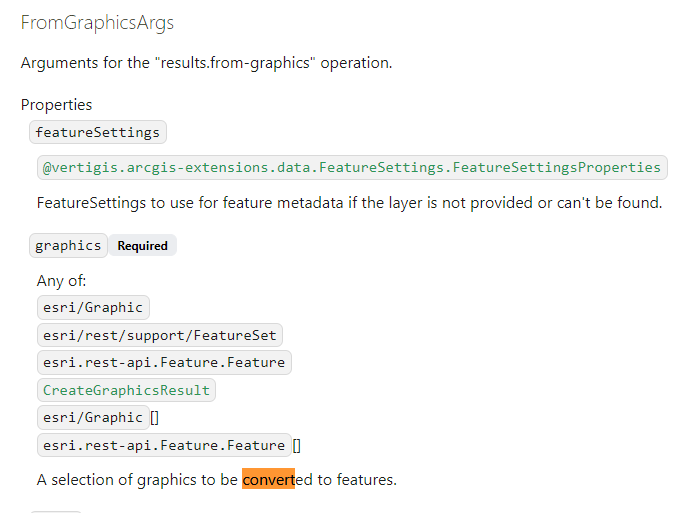
I think if we had something like a table of contents or a flat list of operations, it might be easier to browse the API reference page and find commands that have "graphics" in their name though.
2 -
Hi Amanda,
Thank you for the expansive explanation.
It seems that, as always, the datatypes are the crux of this problem.Kind regards, Daan
0
Bitte melden Sie sich an, um einen Kommentar zu hinterlassen.
Kommentare
4 Kommentare