VSW 5.19.0: How to display the layer symbol?
Beantwortet
VSW 5.19.0: How to display the layer symbol?
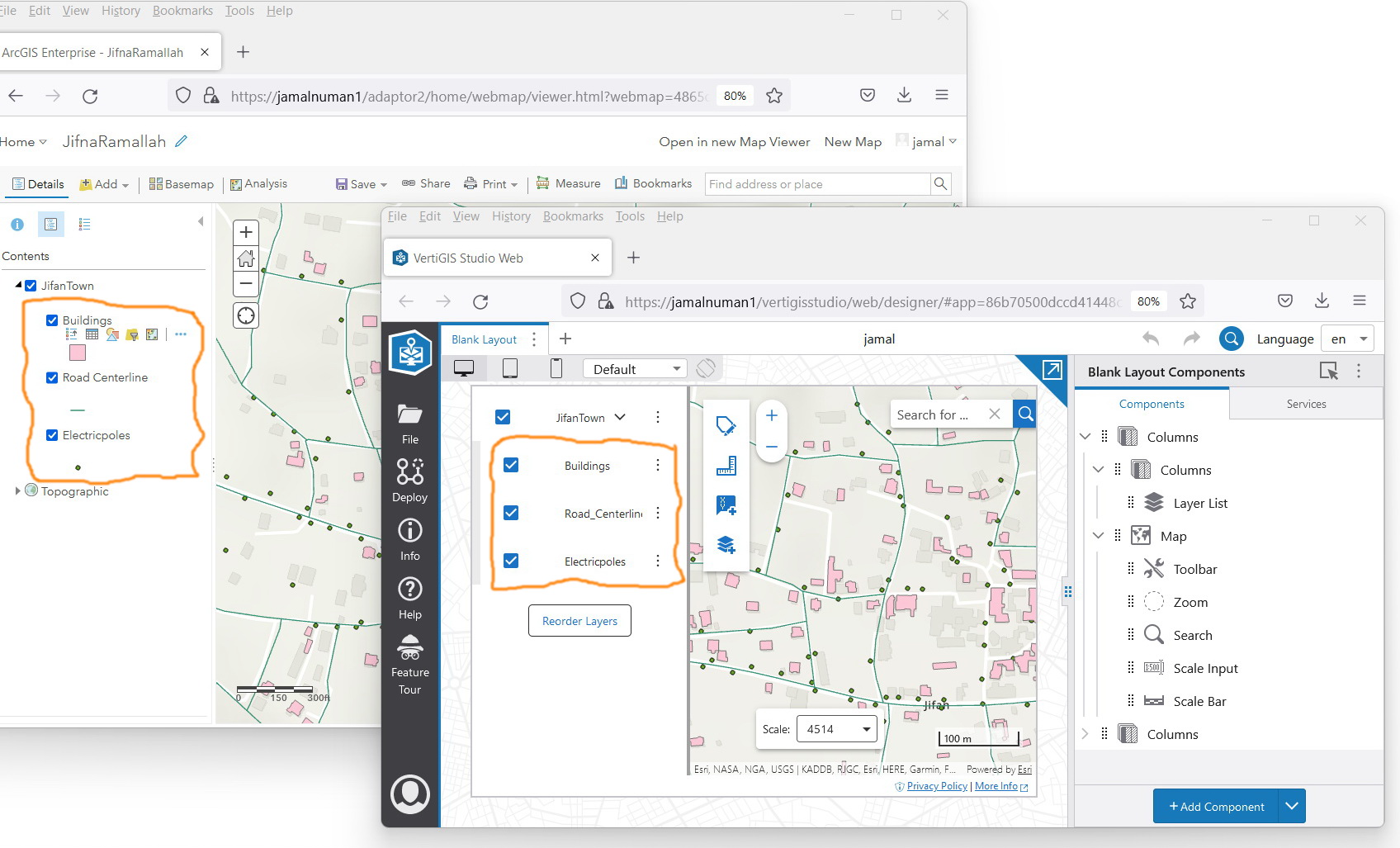
As per the screenshot below, the layer symbols don’t appear in the VSW.
-

In Web you can define a layer icon/symbol (not the layer symbol) as part of the layer extension. This icon is used in many places in Web to help you identify the results coming from that layer (e.g. in the layer list, but also in results views, tooltips, etc.) This is different than what is supplied by the layer for the legend so that for things like colored lines, or colored polygons you can still create a meaningful symbolic representation of a layer.
2 -

Cam Barnard , regarding your comment above, is this still available in 5.31? (I'm referring to layer icons, sort of like the legend, that are displayed in the layer list so you can visually identify which map layers you want to turn off, without having to go look at the legend separately and then come back to the layer list.) If so, where do you set it up? I searched through all the configurations in Layer Extensions and the Layer List and couldn't find anything like that.
0 -

You can find the Manage Layer Icons section on the Map component, just below the Layer Extensions section.
1 -
Ok, great, thank you Nico!
0
Bitte melden Sie sich an, um einen Kommentar zu hinterlassen.
Kommentare
4 Kommentare