Creating a folder directory that contains the file attached using file picker using VeriGIS workflow

Hi All,
I want to create a folder that contains the .dwg file which is added by the end user,
For example, I create a shared a folder “FME_SharedFolder” with path: \\LUBNAJ-PC\FME_SharedFolder
When the end user attaches any file using file picker workflow for example: x.dwg file
The workflow should create a sub-folder in the shared folder with name for example ("yyyyMMddHHmmss) and the sub-folder should contain the added file with name for example: cf.dwg to be used after that in web request tool
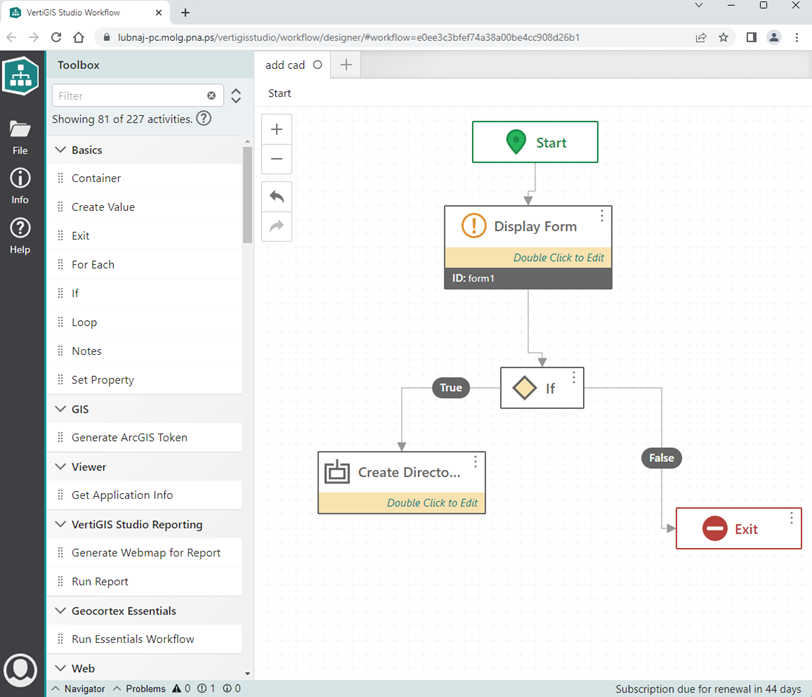
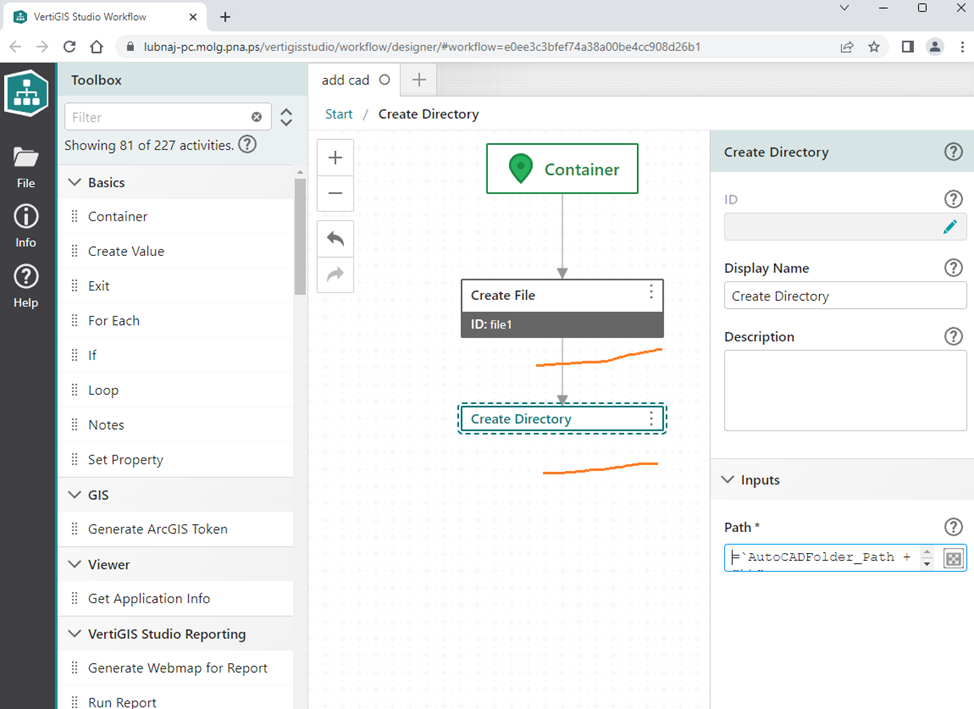
The output should be as below:
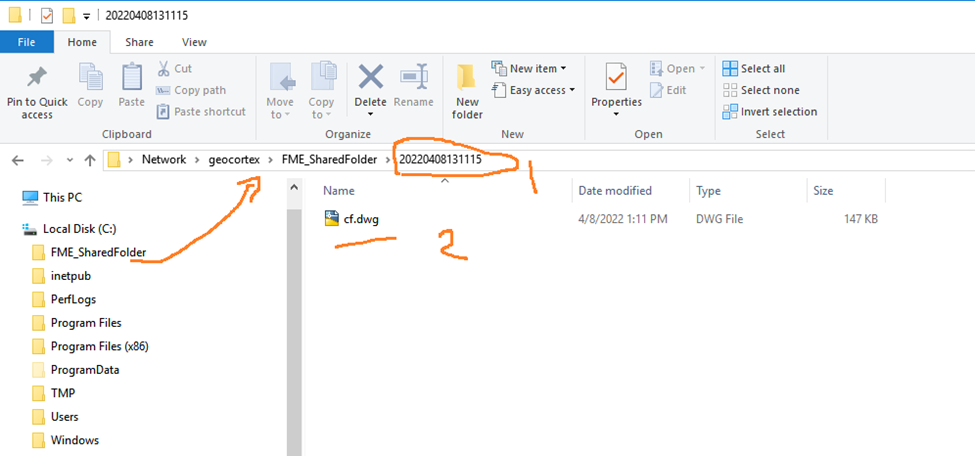
The json code is below:
{"_properties":{"isServerWorkflow":true},"components":[{"id":1,"steps":[{"id":2,"inputs":{},"position":"40,70","purpose":"start","title":"Start","transitions":[{"id":40,"position":"130,130 130,170 120,170 120,190","sourceConnector":"bottom","target":{"id":5},"targetConnector":"top"}]},{"action":"gcx:wf:forms:form:DisplayForm","id":5,"inputs":{"form":{"accessors":[],"code":"resources.forms[values.id]","values":{"id":6}}},"name":"form1","position":"0,190","title":"Display Form","transitions":[{"id":13,"position":"120,310 120,400 140,400 140,420","sourceConnector":"bottom","target":{"id":12},"targetConnector":"top"}]},{"action":"gcx:wf:core::If","id":12,"inputs":{"condition":{"accessors":["$form1"],"annotations":[{"count":6,"index":0,"kind":"idref"}],"code":"$form1.result === \"Submit\"","source":"$form1.result === \"Submit\""}},"position":"80,420","title":"If","transitions":[{"branch":"false","id":15,"position":"200,450 310,450 310,650 330,650","sourceConnector":"right","target":{"id":14},"targetConnector":"left"},{"branch":"true","id":41,"position":"80,450 -60,450 -60,540","sourceConnector":"left","target":{"id":16},"targetConnector":"top"}]},{"action":"gcx:wf:core::Exit","id":14,"inputs":{},"position":"330,620","title":"Exit"},{"action":"gcx:wf:core::Container","id":16,"inputs":{},"position":"-180,540","title":"Create Directory"}]},{"id":17,"steps":[{"id":18,"inputs":{},"position":"-90,-110","purpose":"start","title":"Container","transitions":[{"id":38,"position":"0,-50 0,50","sourceConnector":"bottom","target":{"id":36},"targetConnector":"top"}]},{"action":"gcx:wf:server::CreateDirectory","id":27,"inputs":{"path":{"accessors":[],"annotations":[],"code":"\"AutoCADFolder_Path + \\\"\\\\\\\" + DateTime.Now.ToString(\\\"yyyyMMddHHmmss\\\")\"","source":"`AutoCADFolder_Path + \"\\\\\" + DateTime.Now.ToString(\"yyyyMMddHHmmss\")`\n"}},"position":"-120,200","title":"Create Directory"},{"action":"gcx:wf:core::CreateFile","id":36,"inputs":{"content":{"accessors":["$form1"],"annotations":[{"count":6,"index":0,"kind":"idref"}],"code":"$form1.state.filePicker1.value","source":"$form1.state.filePicker1.value"},"name":"cf.dwg"},"name":"file1","position":"-120,50","title":"Create File","transitions":[{"id":39,"position":"0,120 0,200","sourceConnector":"bottom","target":{"id":27},"targetConnector":"top"}]}]}],"deploymentConfig":{"supportedApps":{"GWV":true}},"designerVersion":"5.28.1+3","forms":[{"defaults":{},"elements":{"filePicker1":{"enabled":true,"fileTypes":".dwg","index":0,"prompt":{"markdown":"Add File"},"rowIndex":0,"rowNumber":0,"title":{"markdown":"Add AutoCAD File"},"type":"FilePicker"},"footer":{"enabled":true,"items":{"0":{"default":true,"index":0,"label":{"markdown":"Submit"},"validates":true,"value":"Submit"},"1":{"index":1,"label":{"markdown":"Cancel"},"validates":false,"value":"cancel"}},"section":"footer","type":"ButtonBar"},"header":{"section":"header","title":{"markdown":"Form Title"},"type":"Header"}},"id":6}],"licenseInfo":{"licenseUrl":"https://lubnaj-pc.molg.pna.ps/vertigisstudio/workflow/service/auth/license"},"start":{"id":2},"transitions":[{"branch":"content","id":19,"source":{"id":16},"target":{"id":18}}]}
I will be very appreciated for any help or If there is a sample workflow that can help me in building the one I need
Thanks in advance
Lubna
-

Hi Lubna , getting a file from a user and writing it to the server requires 1 "client workflow" and 1 "server workflow" because Display Form (with a file picker) is a client-only activity, and writing files is a server-only process. You'd use the Run Workflow activity in the client workflow to run the server workflow.
I have a basic example of the process already set up that I can share.
Client:
{"_properties":{"isServerWorkflow":false},"components":[{"id":2,"steps":[{"id":3,"inputs":{},"position":"0,0","purpose":"start","title":"Start","transitions":[{"id":6,"inputs":{},"position":"90,60 90,110","sourceConnector":"bottom","target":{"id":4}}]},{"action":"gcx:wf:forms:form:DisplayForm","id":4,"inputs":{"form":{"accessors":[],"code":"resources.forms[values.id]","values":{"id":5}}},"name":"form1","position":"-30,110","title":"Display Form","transitions":[{"id":12,"inputs":{},"position":"90,230 90,280","sourceConnector":"bottom","target":{"id":11}}]},{"action":"gcx:wf:core::GetBase64StringFromFile","id":11,"inputs":{"file":{"accessors":["$form1"],"annotations":[{"count":6,"index":0,"kind":"idref"}],"code":"$form1.state.filePicker1.value.files[0]","source":"$form1.state.filePicker1.value.files[0]"}},"name":"getBase64","position":"-30,280","title":"Get Base64 String From File","transitions":[{"id":20,"inputs":{},"position":"90,350 90,400","sourceConnector":"bottom","target":{"id":13},"targetConnector":"top"}]},{"action":"gcx:wf:core::RunWorkflow","id":13,"inputs":{"arguments":{"accessors":["$getBase64","$form1"],"annotations":[{"count":10,"index":27,"kind":"idref"},{"count":6,"index":55,"kind":"idref"}],"code":"{ base64FromClientWorkflow: $getBase64.result,\n fileName: $form1.state.filePicker1.value.files[0].name }","source":"{base64FromClientWorkflow: $getBase64.result,\nfileName:$form1.state.filePicker1.value.files[0].name}"},"url":"https://s10agsge-d2.latitudegeo.com/portal/home/item.html?id=a447c2a0f98e4e4f87903033b49d584d"},"name":"runWorkflow1","position":"-30,400","title":"Run Workflow"}]}],"designerVersion":"5.29.0+32","forms":[{"defaults":{},"elements":{"filePicker1":{"enabled":true,"index":0,"prompt":{"markdown":"Add File"},"title":{"markdown":"File Picker"},"type":"FilePicker"},"footer":{"enabled":true,"items":{"0":{"default":true,"index":0,"label":{"markdown":"Submit"},"validates":true,"value":"submit"},"1":{"index":1,"label":{"markdown":"Cancel"},"validates":false,"value":"cancel"}},"section":"footer","type":"ButtonBar"},"header":{"section":"header","title":{"markdown":"Form Title"},"type":"Header"}},"id":5}],"licenseInfo":{"licenseUrl":"https://support6.latitudegeo.com/VertigisStudio/Workflow/service/auth/license"},"start":{"id":3}}Server:
{"_properties":{"isServerWorkflow":true},"components":[{"id":2,"steps":[{"id":3,"inputs":{},"position":"0,0","purpose":"start","title":"Start","transitions":[{"id":9,"inputs":{},"position":"90,60 90,110","target":{"id":8}}]},{"action":"gcx:wf:server::WriteFileBytes","id":6,"inputs":{"bytes":{"accessors":["$getBytesFromBase64String1"],"annotations":[{"count":26,"index":0,"kind":"idref"}],"code":"$getBytesFromBase64String1.result","source":"$getBytesFromBase64String1.result"},"path":{"accessors":["$getWorkflowInputs1"],"annotations":[{"count":19,"index":39,"kind":"idref"}],"code":"\"C:/ProgramData/Geocortex/Workflow/\" + $getWorkflowInputs1.inputs.fileName","source":"\"C:/ProgramData/Geocortex/Workflow/\" + $getWorkflowInputs1.inputs.fileName"}},"position":"-30,390","title":"Write File Bytes"},{"action":"gcx:wf:core::GetWorkflowInputs","id":8,"inputs":{},"name":"getWorkflowInputs1","position":"-30,110","title":"Get Workflow Inputs","transitions":[{"id":17,"inputs":{},"position":"90,180 90,260","sourceConnector":"bottom","target":{"id":11}}]},{"action":"gcx:wf:core::GetBytesFromBase64String","id":11,"inputs":{"base64":{"accessors":["$getWorkflowInputs1"],"annotations":[{"count":19,"index":0,"kind":"idref"}],"code":"$getWorkflowInputs1.inputs.base64FromClientWorkflow","source":"$getWorkflowInputs1.inputs.base64FromClientWorkflow"}},"name":"getBytesFromBase64String1","position":"-30,260","title":"Get Bytes From Base64 String","transitions":[{"id":12,"inputs":{},"position":"90,330 90,390","sourceConnector":"bottom","target":{"id":6}}]}]}],"designerVersion":"5.29.0+32","licenseInfo":{"licenseUrl":"https://support6.latitudegeo.com/VertigisStudio/Workflow/service/auth/license"},"start":{"id":3}}I'd suggest starting with that as a base. Once you've imported them, update the Run Workflow activity to use your server workflow URL, and update the Write File Bytes path to your workflow's "data directory" if it's not at "C:/ProgramData/Geocortex/Workflow/" (you can check its location in the workflow post installer). I do recommend starting with using the workflow's data directory, since using that location rules out any folder permission problems. Then once you've got the basic example working, change just 1 thing at a time so that if it stops working you'll know what cause to troubleshoot. Ie.:
- Add Create Directory activity
- Update the file path to use the created directory
- Update the file path to use the desired network drive path
1 -
Thank you for your help Amanda,
I used the workflow which written by you and it was very helpful,
I had some edit on it by adding "create directory" to create folder with specific name that contain the datetime now but it seams not working well with me,
I used this way because the end users can add cad file same time but not on the same second, so I go to this way to make folder "directory" to each end user to be used after that in web request that convert cad file to json file then convert the json file to graphic added to the web studio
This is what I am looking for
If you have any idea to build workflow with more simple way than the way I used, I will be very appreciated
the workflows that I make edits on them as below:
Client
{"_properties":{"isServerWorkflow":false},"components":[{"id":2,"steps":[{"id":3,"inputs":{},"position":"0,0","purpose":"start","title":"Start","transitions":[{"id":6,"inputs":{},"position":"90,60 90,110","sourceConnector":"bottom","target":{"id":4}}]},{"action":"gcx:wf:forms:form:DisplayForm","id":4,"inputs":{"form":{"accessors":[],"code":"resources.forms[values.id]","values":{"id":5}}},"name":"form1","position":"-30,110","title":"Display Form","transitions":[{"id":12,"inputs":{},"position":"90,230 90,280","sourceConnector":"bottom","target":{"id":11}}]},{"action":"gcx:wf:core::GetBase64StringFromFile","id":11,"inputs":{"file":{"accessors":["$form1"],"annotations":[{"count":6,"index":0,"kind":"idref"}],"code":"$form1.state.filePicker1.value.files[0]","source":"$form1.state.filePicker1.value.files[0]"}},"name":"getBase64","position":"-30,280","title":"Get Base64 String From File","transitions":[{"id":17,"position":"90,350 90,450","sourceConnector":"bottom","target":{"id":13},"targetConnector":"top"}]},{"action":"gcx:wf:core::RunWorkflow","id":13,"inputs":{"arguments":{"accessors":["$getBase64","$form1"],"annotations":[{"count":10,"index":27,"kind":"idref"},{"count":6,"index":55,"kind":"idref"}],"code":"{ base64FromClientWorkflow: $getBase64.result,\n fileName: $form1.state.filePicker1.value.files[0].name }","source":"{base64FromClientWorkflow: $getBase64.result,\nfileName:$form1.state.filePicker1.value.files[0].name}"},"url":"https://lubnaj-pc.molg.pna.ps/adaptor/home/item.html?id=7b20acfe3ab84015b9d59fb738fff873"},"name":"runWorkflow1","position":"-30,450","title":"Run Workflow"}]}],"designerVersion":"5.28.1+3","forms":[{"defaults":{},"elements":{"filePicker1":{"enabled":true,"fileTypes":"*","index":0,"prompt":{"markdown":"Add File"},"rowIndex":0,"rowNumber":0,"size":1,"title":{"markdown":"File Picker"},"type":"FilePicker"},"footer":{"enabled":true,"items":{"0":{"default":true,"index":0,"label":{"markdown":"Submit"},"validates":true,"value":"submit"},"1":{"index":1,"label":{"markdown":"Cancel"},"validates":false,"value":"cancel"}},"section":"footer","type":"ButtonBar"},"header":{"section":"header","title":{"markdown":"Form Title"},"type":"Header"}},"id":5}],"licenseInfo":{"licenseUrl":"https://lubnaj-pc.molg.pna.ps/vertigisstudio/workflow/service/auth/license"},"start":{"id":3}}Server
{"_properties":{"isServerWorkflow":true},"components":[{"id":2,"steps":[{"id":3,"inputs":{},"position":"0,0","purpose":"start","title":"Start","transitions":[{"id":9,"inputs":{},"position":"90,60 90,110","target":{"id":8}}]},{"action":"gcx:wf:server::WriteFileBytes","id":6,"inputs":{"bytes":{"accessors":["$getBytesFromBase64String1"],"annotations":[{"count":26,"index":0,"kind":"idref"}],"code":"$getBytesFromBase64String1.result","source":"$getBytesFromBase64String1.result"},"path":{"accessors":["DateTime","$getWorkflowInputs1"],"annotations":[{"count":8,"index":44,"kind":"idref"},{"count":19,"index":85,"kind":"idref"}],"code":"\"C:/ProgramData/Geocortex/Workflow/fme/\" + DateTime.Now.ToString(\"yyyyMMddHHmmss\") + $getWorkflowInputs1.inputs.fileName","source":" \"C:/ProgramData/Geocortex/Workflow/fme/\" + DateTime.Now.ToString(\"yyyyMMddHHmmss\") +$getWorkflowInputs1.inputs.fileName\n\n"}},"position":"-40,490","title":"Write File Bytes"},{"action":"gcx:wf:core::GetWorkflowInputs","id":8,"inputs":{},"name":"getWorkflowInputs1","position":"-30,110","title":"Get Workflow Inputs","transitions":[{"id":17,"inputs":{},"position":"90,180 90,260","sourceConnector":"bottom","target":{"id":11}}]},{"action":"gcx:wf:core::GetBytesFromBase64String","id":11,"inputs":{"base64":{"accessors":["$getWorkflowInputs1"],"annotations":[{"count":19,"index":0,"kind":"idref"}],"code":"$getWorkflowInputs1.inputs.base64FromClientWorkflow","source":"$getWorkflowInputs1.inputs.base64FromClientWorkflow"}},"name":"getBytesFromBase64String1","position":"-30,260","title":"Get Bytes From Base64 String","transitions":[{"id":14,"position":"90,330 90,370 80,370 80,390","sourceConnector":"bottom","target":{"id":13},"targetConnector":"top"}]},{"action":"gcx:wf:server::CreateDirectory","id":13,"inputs":{"path":{"accessors":["DateTime"],"annotations":[{"count":8,"index":43,"kind":"idref"}],"code":"\"C:/ProgramData/Geocortex/Workflow/fme/\" + DateTime.Now.ToString(\"yyyyMMddHHmmss\")","source":"\"C:/ProgramData/Geocortex/Workflow/fme/\" + DateTime.Now.ToString(\"yyyyMMddHHmmss\")"}},"position":"-40,390","title":"Create Directory","transitions":[{"id":15,"position":"80,420 80,490","sourceConnector":"bottom","target":{"id":6},"targetConnector":"top"}]}]}],"designerVersion":"5.28.1+3","licenseInfo":{"licenseUrl":"https://lubnaj-pc.molg.pna.ps/vertigisstudio/workflow/service/auth/license"},"start":{"id":3}}Best,
Lubna
0
Bitte melden Sie sich an, um einen Kommentar zu hinterlassen.
Kommentare
2 Kommentare