Basic API reference?

Where can I find thorough descriptions of the data structures when filling in workflow activity parameters?
For example, a good description of the use of context
=$getWorkflowInputs1.inputs.context[0].attributes["UID"]
Or to get the date part of a DateTimePicker,
'InspDate':$form1.state.dateTimePicker1.value.value
Or
Descriptions of state, result, value, items, etc. and other generically labelled properties
Or
That I can use the backtick ` to escape evaluation and place variables within an expression
Or
Which specific parameters depend on which deployment options. For example, Combine Mode in the Show Results activity is not compatible with Web or Mobile?
I see various "tech tips" which almost answer many questions I have had, but fall short of covering the use case I'm trying to work out.
-

Hi Alex,
The activity reference and form element reference are good places to start. Some specific property information (like context) isn't documented, but there are some examples via "Create New Workflow" in Web when adding a menu item, or converting a custom command to a workflow. Specific viewer compatibility is available for each activity. If you need information on commands and operations (which can be used in Workflow), there is information for Web and Mobile at https://developers.vertigisstudio.com/ .
As for the backticks, that's a JavaScript functionality that Workflow expressions can leverage, because Workflow expressions are JavaScript expressions. The most reliable JavaScript documentation is here: https://developer.mozilla.org/en-US/docs/Web/JavaScript.
Hopefully this is helpful for you!
Rafael
0 -
Thanks for the response Rafael. I have been to these places in the documentation before, but I did find a few clarifications by reading more carefully on certain activities and form elements.
Working with context could still use clarification. Do you know which "new workflows" in Web have this example? I haven't been able to find it. Are there plans to document this, as it seems like a crucial piece of functionality?
0 -
Unless I am missing an alternative to context that is more commonly used for using attributes of selected features?
0 -
The Get Feature Attribute Value activity can be used to access values of specific attributes of the provided features.
0 -
I am building an override workflow for editing features and I had used to use the syntax above in the past: =$getWorkflowInputs1.inputs.context[0].attributes["UID"]
But now, after some investigation, I find that I need to use this syntax, without the [0] on context: =$getWorkflowInputs1.inputs.context.attributes["UID"]
It is minor, but cost me an hour or two. Has this been a change in the use of context over the past year or is there a difference between running a workflow via Feature Action versus Override?
0 -
I'm not completely sure if there's a difference, but all of the information about run-time workflow inputs (including context) is here: Use a Workflow's Inputs in the Workflow.
0 -
Rafael,
I have a workflow I have selected to deploy for Web and Mobile. It will primarily be used in Mobile, but Web is better for troubleshooting with the Chrome DevTools.
I find that =$getWorkflowInputs1.inputs.context.attributes["UID"] works only in Mobile.
But =$getWorkflowInputs1.inputs.context[0].attributes["UID"] works only in Web.
I would like to reconcile this difference so I do not have to duplicate code within my workflow to account for which deployment the workflow is being used in.
0 -
Get Application Info is certainly an option; I did a test and found that the name property for Web will be "GXW":
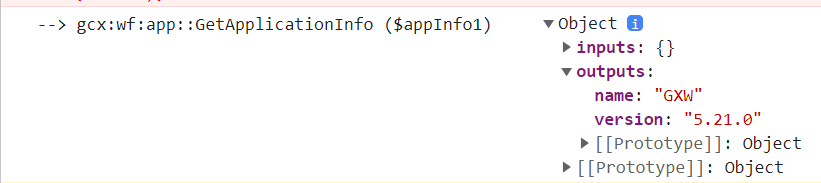 0
0 -
and Mobile is "VSM"
But this requires a lot of code duplication to get workflow inputs, populate form values, and create/add features.
0 -
If you want the workflow to work with both Web and Mobile, I'd recommend that you do a "setup" at the beginning and set all of the values that change depending on the environment there, and reference them later in the workflow.
e.g, Create Value for accessing feature, expression input:
=($appInfo1.name == "GXW") ? $getWorkflowInputs1.inputs.context[0] : $getWorkflowInputs1.inputs.context
And then reference UID with
$value1.result.attributes["UID"]
0 -
Okay, that's a good use of Create Value and the ternary that address the need for massive duplication
It's not that I necessarily want to use the workflow in both Mobile and Web, but Web has much better debugging capability, even though the Mobile and Web runtimes differ significantly in some places. I just want to accurately debug my workflows.
And Sandbox (name="WAB") doesn't have context values at all, so I can't debug properly there either.
0
Bitte melden Sie sich an, um einen Kommentar zu hinterlassen.
Kommentare
11 Kommentare