Format date from query results in workflow

Hello,
I have a workflow that queries feature layer and then display's results. My issue is that the date field is displayed as ArcGIS date type field (ex: "1467206460000") rather than a normal date format.
I added the ForEach activity and Format Date activity before displaying my results, but it seems to only format the date for the first record in the results correctly and leaves the rest unformatted.
Does any know how to loop through each record in a query results and format the date field?
Thanks,
Valerie
-

Have you tried syntax like this below? This is just returning the date value as something readable like 2013-08-15T00:00:00.000Z. You'll have to work this logic into your loop, but you get the idea.
= new Date($query3.results.features[0].attributes["ASMNT_DT"]).toISOString()
0 -
Thank you Ryan for your response.
I was not able to get that syntax to work.
I am wondering if there is a way to just format each date from query results using a For Each loop? I can either make it work that it only formats the first date in the query results or formats all of the dates in the query result to the value of the first result.
Thanks,
Valerie
0 -

Valerie Petersen in your Show Results activity, what do you have configured for the first input?
Something like =$query1.results will include all of the field metadata, and the results list may be able to understand which fields are dates vs numbers. When I tested in Web, this formatted the dates appropriately without any extra steps needed on the workflow-side. When I tested with =$query1.features instead, I was able to reproduce the issue you described. That output just has the feature data (the attribute names and values), without the extra info about what type each field is.
0 -

Greetings:
I'm having the same issue, I have a query and a show results from that query activity. When the show results comes in the date format is numerical.
When it uses the REST query it comes back as numeric as expected. But when it's time to display under show results it is not formatted correctly.
Example
EXECUTED_DATE: 1332288000000
Should be Mar 21, 2012 12:00 AM
I've tried “Get Feature Attribute Values” w/ Format Date (as suggested in another post) and that does fix the format, but I can't feed it back into the showresults. Is there an easier way without JS to display in the show results?
Under show results I did change it from
.feature
.features
.results
as suggested above, but no change in date format.
Thank you..0 -

William Bean
I have somewhat different workflow. But here is how I formatted dates and it works.
Hope that helps.
I start with a display form, for user to enter start and end dates, then i use ‘Format Date’ Activity.
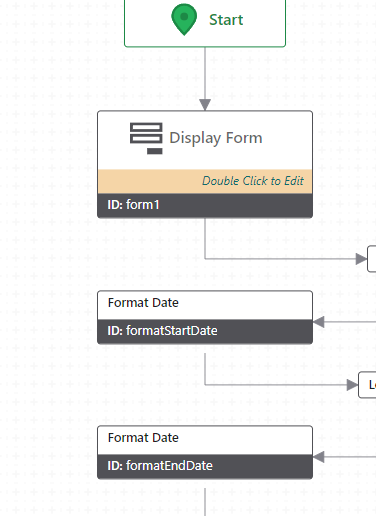

Date* (input) =$form1.state.dateTimePicker1.value.value
Then I pass the dates, as parameters, into ‘run report’ actitity
={"Date_Start":$formatStartDate.iso, "Date_End":$formatEndDate.iso}
1 -

Bill's question pertained specifically to the display of dates in a GVH (Geocortx Viewer for HTML5) results view when using the Show Results activity with query results from a Workflow. Note that VertiGIS Studio Web displays the results in the expected format without intervention.
I put together this generic Workflow example to demonstrate how to approach re-formatting the field values for an arbitrary number of "esriFieldTypeDate" fields with unknown names within a collection of REST query results. It includes a display form that provides test cases for datasets with 0, 1, or multiple datetime fields, and also has an optional check that bypasses the formatting if being executed in Studio Web. You can import the JSON, save the workflow, and execute it in GVH or VSW yourself to see how it works. Note for GVH that you can add the &debug=true parameter to the end of your viewer launch URL, and then if you open the browser developer tools and look at the Console you can see the execution of each workflow activity and inspect the values of various objects.
Copy the code in the codeblock below, save it to a text file with a .json suffix, and you can import it into a VertiGIS Studio Workflow designer (the workflow below was designed in version 5.39.1) to view/run:{"_properties":{"isServerWorkflow":false},"components":[{"id":2,"steps":[{"id":3,"inputs":{},"position":"110,-200","purpose":"start","title":"Start","transitions":[{"id":204,"inputs":{},"position":"200,-140 200,-90","target":{"id":203}}]},{"action":"gcx:wf:arcgis:query:QueryTask","id":4,"inputs":{"count":10,"outFields":"*","url":{"accessors":["$form1"],"annotations":[{"count":6,"index":0,"kind":"idref"}],"code":"$form1.state.radioGroup1.value","source":"$form1.state.radioGroup1.value"},"where":"1=1"},"name":"query1","position":"80,190","title":"Query Layer","transitions":[{"id":207,"inputs":{},"position":"200,250 200,300","sourceConnector":"bottom","target":{"id":206},"targetConnector":"top"}]},{"action":"gcx:wf:arcgis::SelectFeatures","description":"Display the results in the viewer.","id":6,"inputs":{"featureSetDisplayName":"REST Query Results","features":{"accessors":["$query1"],"annotations":[{"count":7,"index":0,"kind":"idref"}],"code":"$query1.results","source":"$query1.results"}},"position":"-60,1180","title":"Show Results"},{"action":"gcx:wf:core:loop:ForEach","description":"Iterate over the features in the query results.","id":9,"inputs":{"items":{"accessors":["$query1"],"annotations":[{"count":7,"index":0,"kind":"idref"}],"code":"$query1.features","source":"$query1.features"}},"name":"forEach1_ResultFeatures","position":"-60,970","title":"For Each","transitions":[{"id":14,"position":"60,1130 60,1180","target":{"id":6}}]},{"action":"gcx:wf:core:loop:ForEach","description":"Iterate over the fields of the query results to find any \"esriFieldTypeDate\" fields.","id":27,"inputs":{"items":{"accessors":["$query1"],"annotations":[{"count":7,"index":0,"kind":"idref"}],"code":"$query1.results.fields","source":"$query1.results.fields"}},"name":"forEach3_AttributeList","position":"-310,550","title":"For Each","transitions":[{"id":157,"position":"-190,730 -190,780","sourceConnector":"bottom","target":{"id":171},"targetConnector":"top"}]},{"action":"gcx:wf:core::CreateValue","description":"Create a collection to hold the names of any date fields in the results feature set.","id":33,"inputs":{"expression":{"accessors":[],"annotations":[],"code":"[]","source":"[]"}},"name":"listOfDateFields","position":"-310,380","title":"Create Value","transitions":[{"id":35,"position":"-190,500 -190,550","target":{"id":27}}]},{"action":"gcx:wf:core::If","description":"If there are no date fields, then no formatting is required.","id":171,"inputs":{"condition":{"accessors":["$listOfDateFields"],"annotations":[{"count":17,"index":0,"kind":"idref"}],"code":"$listOfDateFields.result.length < 1","source":"$listOfDateFields.result.length < 1"}},"position":"-310,780","title":"If","transitions":[{"branch":"true","id":175,"inputs":{},"position":"-310,835 -460,835 -460,940","sourceConnector":"left","target":{"id":173},"targetConnector":"top"},{"branch":"false","id":176,"position":"-70,835 60,835 60,970","sourceConnector":"right","target":{"id":9},"targetConnector":"top"}]},{"action":"gcx:wf:core::Log","id":173,"inputs":{"message":"\"No esriFieldTypeDate Fields Found\""},"position":"-580,940","title":"Log","transitions":[{"id":177,"position":"-460,970 -460,1210 -60,1210","sourceConnector":"bottom","target":{"id":6},"targetConnector":"left"}]},{"action":"gcx:wf:app::GetApplicationInfo","id":203,"inputs":{},"name":"appInfo1","position":"80,-90","title":"Get Application Info","transitions":[{"id":212,"position":"200,-30 200,20","target":{"id":210}}]},{"action":"gcx:wf:core::If","description":"If not VSW, then format the date values.","id":206,"inputs":{"condition":{"accessors":["$appInfo1"],"annotations":[{"count":9,"index":0,"kind":"idref"}],"code":"$appInfo1.name != \"GXW\"","source":"$appInfo1.name != \"GXW\""}},"position":"80,300","title":"If","transitions":[{"branch":"true","id":208,"position":"80,355 -50,355 -50,440 -70,440","target":{"id":33}},{"branch":"false","id":209,"position":"320,355 340,355 340,1210 180,1210","sourceConnector":"right","target":{"id":6},"targetConnector":"right"}]},{"action":"gcx:wf:forms:form:DisplayForm","id":210,"inputs":{"form":{"accessors":[],"code":"resources.forms[values.id]","values":{"id":211}}},"name":"form1","position":"80,20","title":"Display Form","transitions":[{"id":213,"position":"200,140 200,190","target":{"id":4}}]},{"action":"gcx:wf:core::Annotation","description":"Geocortex Viewer for HTML 5 (GVH) displays the raw date value for the results of an ESRI REST Query.\n\nThis workflow is designed to search for any \"esriFieldTypeDate\" values in a query result, and then format those dates into a human readable format before showing the results. \n\nNote that this only modifies the results set within the workflow - the source data at the ArcGIS REST endpoint is not modified.\n\nIf there are no date fields or the application running this workflow is VertiGIS Studio Web then no formatting is required.","id":214,"inputs":{},"position":"-320,-140","title":"Workflow Description"}]},{"id":10,"steps":[{"id":11,"inputs":{},"position":"0,0","purpose":"start","title":"For Each","transitions":[{"id":215,"position":"90,60 90,130","sourceConnector":"bottom","target":{"id":121},"targetConnector":"top"}]},{"action":"gcx:wf:core::If","description":"If there is only one date field, then re-format that field value for each feature. Otherwise, iterate over each date field for each feature.","id":121,"inputs":{"condition":{"accessors":["$listOfDateFields"],"annotations":[{"count":17,"index":0,"kind":"idref"}],"code":"$listOfDateFields.result.length <= 1","source":"$listOfDateFields.result.length <= 1"}},"position":"-30,130","title":"If","transitions":[{"branch":"false","id":137,"inputs":{},"position":"210,200 290,200 290,310","sourceConnector":"right","target":{"id":123},"targetConnector":"top"},{"branch":"true","id":201,"position":"-30,200 -130,200 -130,310","sourceConnector":"left","target":{"id":200},"targetConnector":"top"}]},{"action":"gcx:wf:core:loop:ForEach","description":"In the case of multiple date fields, iterate over each date field for each feature.","id":123,"inputs":{"items":{"accessors":["$listOfDateFields"],"annotations":[{"count":17,"index":0,"kind":"idref"}],"code":"$listOfDateFields.result","source":"$listOfDateFields.result"}},"name":"forEach4_FormatMultipleFields","position":"170,310","title":"For Each"},{"action":"gcx:wf:core::FormatDate","id":160,"inputs":{"date":{"accessors":["$attributeValue2"],"annotations":[{"count":16,"index":0,"kind":"idref"}],"code":"$attributeValue2.value","source":"$attributeValue2.value"},"format":"LLL"},"name":"date3","position":"-250,410","title":"Format Date","transitions":[{"id":164,"inputs":{},"position":"-130,470 -130,520","target":{"id":162}}]},{"action":"gcx:wf:arcgis::SetFeatureAttribute","id":162,"inputs":{"attributeName":{"accessors":["$listOfDateFields"],"annotations":[{"count":17,"index":0,"kind":"idref"}],"code":"$listOfDateFields.result[0].toString()","source":"$listOfDateFields.result[0].toString()"},"attributeValue":{"accessors":["$date3"],"annotations":[{"count":6,"index":0,"kind":"idref"}],"code":"$date3.formatted","source":"$date3.formatted"},"feature":{"accessors":["$forEach1_ResultFeatures"],"annotations":[{"count":24,"index":0,"kind":"idref"}],"code":"$forEach1_ResultFeatures.item","source":"$forEach1_ResultFeatures.item"}},"position":"-250,520","title":"Set Feature Attribute"},{"action":"gcx:wf:arcgis::GetAttributeValue","id":200,"inputs":{"attribute":{"accessors":["$listOfDateFields"],"annotations":[{"count":17,"index":0,"kind":"idref"}],"code":"$listOfDateFields.result[0].toString()","source":"$listOfDateFields.result[0].toString()"},"features":{"accessors":["$query1"],"annotations":[{"count":7,"index":0,"kind":"idref"}],"code":"$query1.results","source":"$query1.results"},"index":{"accessors":["$forEach1_ResultFeatures"],"annotations":[{"count":24,"index":0,"kind":"idref"}],"code":"$forEach1_ResultFeatures.pass","source":"$forEach1_ResultFeatures.pass"}},"name":"attributeValue2","position":"-250,310","title":"Get Feature Attribute Value","transitions":[{"id":202,"position":"-130,370 -130,410","target":{"id":160}}]}]},{"id":28,"steps":[{"id":29,"inputs":{},"position":"0,0","purpose":"start","title":"For Each","transitions":[{"id":37,"position":"90,60 90,120","target":{"id":36}}]},{"action":"gcx:wf:core::If","id":36,"inputs":{"condition":{"accessors":["$forEach3_AttributeList"],"annotations":[{"count":23,"index":0,"kind":"idref"}],"code":"$forEach3_AttributeList.item.type === \"esriFieldTypeDate\"","source":"$forEach3_AttributeList.item.type === \"esriFieldTypeDate\""}},"position":"30,120","title":"If","transitions":[{"branch":"true","id":39,"position":"30,150 0,150 0,265 -20,265","sourceConnector":"left","target":{"id":38},"targetConnector":"right"}]},{"action":"gcx:wf:core::AddItem","id":38,"inputs":{"collection":{"accessors":["$listOfDateFields"],"annotations":[{"count":17,"index":0,"kind":"idref"}],"code":"$listOfDateFields.result","source":"$listOfDateFields.result"},"item":{"accessors":["$forEach3_AttributeList"],"annotations":[{"count":23,"index":0,"kind":"idref"}],"code":"$forEach3_AttributeList.item.name","source":"$forEach3_AttributeList.item.name"}},"position":"-260,250","title":"Add Item"}]},{"id":93,"steps":[{"id":95,"inputs":{},"position":"0,0","purpose":"start","title":"For Each","transitions":[{"id":216,"position":"90,60 90,120","sourceConnector":"bottom","target":{"id":195},"targetConnector":"top"}]},{"action":"gcx:wf:core::FormatDate","id":181,"inputs":{"date":{"accessors":["$attributeValue1"],"annotations":[{"count":16,"index":0,"kind":"idref"}],"code":"$attributeValue1.value","source":"$attributeValue1.value"},"format":"LLL"},"name":"date4","position":"-30,230","title":"Format Date","transitions":[{"id":185,"inputs":{},"position":"90,290 90,340","target":{"id":183}}]},{"action":"gcx:wf:arcgis::SetFeatureAttribute","id":183,"inputs":{"attributeName":{"accessors":["$forEach4_FormatMultipleFields"],"annotations":[{"count":30,"index":0,"kind":"idref"}],"code":"$forEach4_FormatMultipleFields.item.toString()","source":"$forEach4_FormatMultipleFields.item.toString()"},"attributeValue":{"accessors":["$date4"],"annotations":[{"count":6,"index":0,"kind":"idref"}],"code":"$date4.formatted","source":"$date4.formatted"},"feature":{"accessors":["$forEach1_ResultFeatures"],"annotations":[{"count":24,"index":0,"kind":"idref"}],"code":"$forEach1_ResultFeatures.item","source":"$forEach1_ResultFeatures.item"}},"position":"-30,340","title":"Set Feature Attribute"},{"action":"gcx:wf:arcgis::GetAttributeValue","id":195,"inputs":{"attribute":{"accessors":["$forEach4_FormatMultipleFields"],"annotations":[{"count":30,"index":0,"kind":"idref"}],"code":"$forEach4_FormatMultipleFields.item.toString()","source":"$forEach4_FormatMultipleFields.item.toString()"},"features":{"accessors":["$query1"],"annotations":[{"count":7,"index":0,"kind":"idref"}],"code":"$query1.results","source":"$query1.results"},"index":{"accessors":["$forEach1_ResultFeatures"],"annotations":[{"count":24,"index":0,"kind":"idref"}],"code":"$forEach1_ResultFeatures.pass","source":"$forEach1_ResultFeatures.pass"}},"name":"attributeValue1","position":"-30,120","title":"Get Feature Attribute Value","transitions":[{"id":197,"position":"90,180 90,230","target":{"id":181}}]}]}],"deploymentConfig":{"supportedApps":{"GVH":true}},"designerVersion":"5.39.1+3","forms":[{"defaults":{},"elements":{"footer":{"enabled":true,"items":{"0":{"default":true,"index":0,"label":{"markdown":"Submit"},"validates":true,"value":"submit"},"1":{"index":1,"label":{"markdown":"Cancel"},"validates":false,"value":"cancel"}},"section":"footer","type":"ButtonBar"},"header":{"section":"header","title":{"markdown":"Select a Service to Query"},"type":"Header"},"radioGroup1":{"current":"0","enabled":true,"index":0,"items":{"0":{"index":0,"label":{"markdown":"Capital City Buildings (0 Date Fields)"},"value":"https://services.arcgis.com/p3UBboyC0NH1uCie/arcgis/rest/services/CapitalCity_Web_2_0/FeatureServer/2"},"1":{"index":1,"label":{"markdown":"Capital City Water Lines (1 Date Field)"},"value":"https://services.arcgis.com/p3UBboyC0NH1uCie/arcgis/rest/services/CapitalCity_Web_2_0/FeatureServer/1"},"2":{"index":2,"label":{"markdown":"Esri Sample Server Hurricanes (2 Date Fields)"},"value":"https://sampleserver6.arcgisonline.com/arcgis/rest/services/Hurricanes/MapServer/0"}},"rowIndex":0,"rowNumber":0,"type":"RadioGroup"}},"id":211}],"licenseInfo":{"licenseeId":"88cb61d6-af47-9b3e-5181-ed674c4c0815"},"start":{"id":3},"transitions":[{"branch":"loop","id":12,"source":{"id":9},"target":{"id":11}},{"branch":"loop","id":30,"source":{"id":27},"target":{"id":29}},{"branch":"loop","id":135,"inputs":{},"source":{"id":123},"target":{"id":95}}]}1
Bitte melden Sie sich an, um einen Kommentar zu hinterlassen.
Kommentare
6 Kommentare