VSW - Add Layers interface

Is there a way in VS Web to configure the Add Layers interface to show all Organization Content instead of My Content when it opens? It feels like this should be possible. I tried this with both a Creator and Viewer user type, but always end up having to open the filter and select the organization to find the layers I'm looking for.
Testing with SaaS designer linked to our AGOL.
-

Any updates on this, I have similar issues on that as well.
0 -
I ended with creating custom form using vertigis workflow to list all necessary layer to be added in the application.
0 -

Hi Davood, do you mind to share the logic of your workflow to list the layers for users to add to application?
Thanks, Michelle
0 -

I have this issue as well, interested in any solutions.
0 -

I also get quite a lot of comments about this. It would be great if ‘organizational content’ could be (configured to be) the default.
0 -

Hi, perhaps you already aware of this but just putting it out here in case someone still needs it. You can achieve it either through:
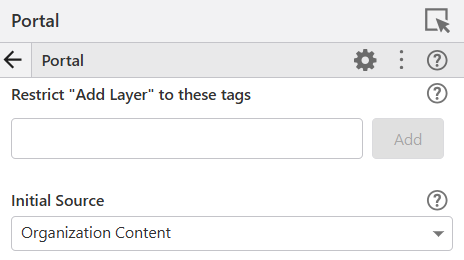
- Specifying the source via Service tab > Portal. Choose Organization Content as Initial Source.
- Override the Portal setting above by customising the 'Add from Esri portal' command.
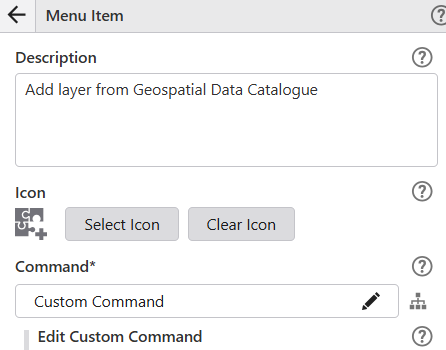
This way you can narrow down the options further. In the example below, the add-from-portal window will only show the Organization items that have specific_tags in the layer.
[
    {
        "name": "portal.choose-layers",
        "arguments": {
            "initialSource": "organization",
            "layerFilterTags": [
                "sepcific_tags"
            ],
            "sources": [
                "organization"
            ]
        }
    },
    "map.add-layers"
]
0 -
Hi, on another but relevant note, does someone know if there is any way to display all of the portal items in the add-from-portal window instead of it showing a subset of items? See screen shot below, it shows 50 of 165 available results.
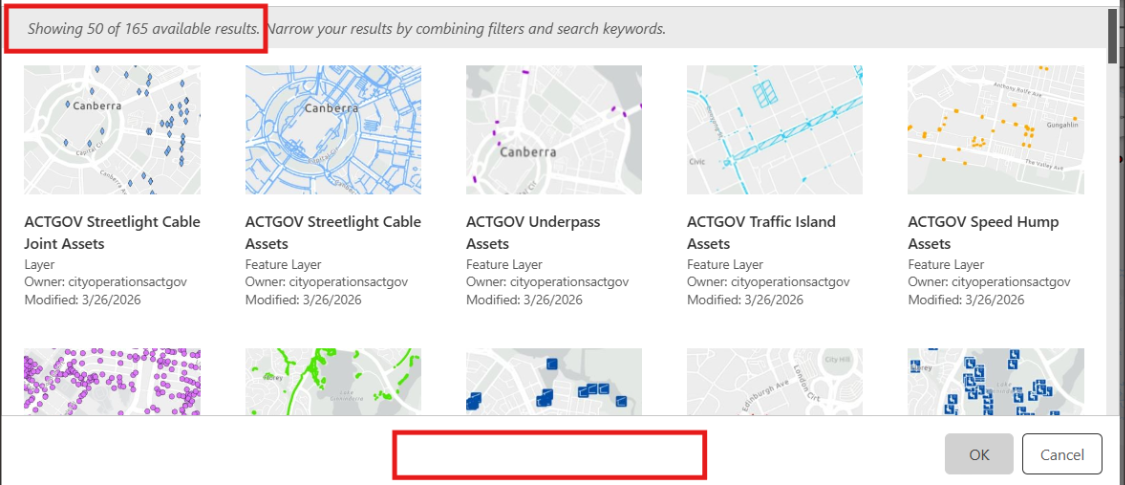
It would also be nice to have next/previous buttons down the bottom to enable users navigate to the next page of item list.
0
Bitte melden Sie sich an, um einen Kommentar zu hinterlassen.
Kommentare
7 Kommentare